Think of your website like a car. If the engine’s slow, it doesn’t matter how good it looks. Nobody’s waiting around for a sluggish ride, and your visitors aren’t either. That’s exactly what site speed does to your online presence. It decides whether people stay or leave before they even see what you offer.
Site speed depends on quite a few things. Hosting quality, image sizes, and code cleanliness all play a part. Third-party scripts and server response time factor in, too. That’s why agencies like Matter Solutions treat website speed as a starting point, not an afterthought, because the impact on your page speed and overall user experience is hard to ignore.
If better Google rankings are what you’re after, you’re in the right place. This article covers Core Web Vitals, load time, site speed impact on SEO, Google Analytics data, and practical fixes. By the end, you’ll know exactly where your site stands and what to do about it.
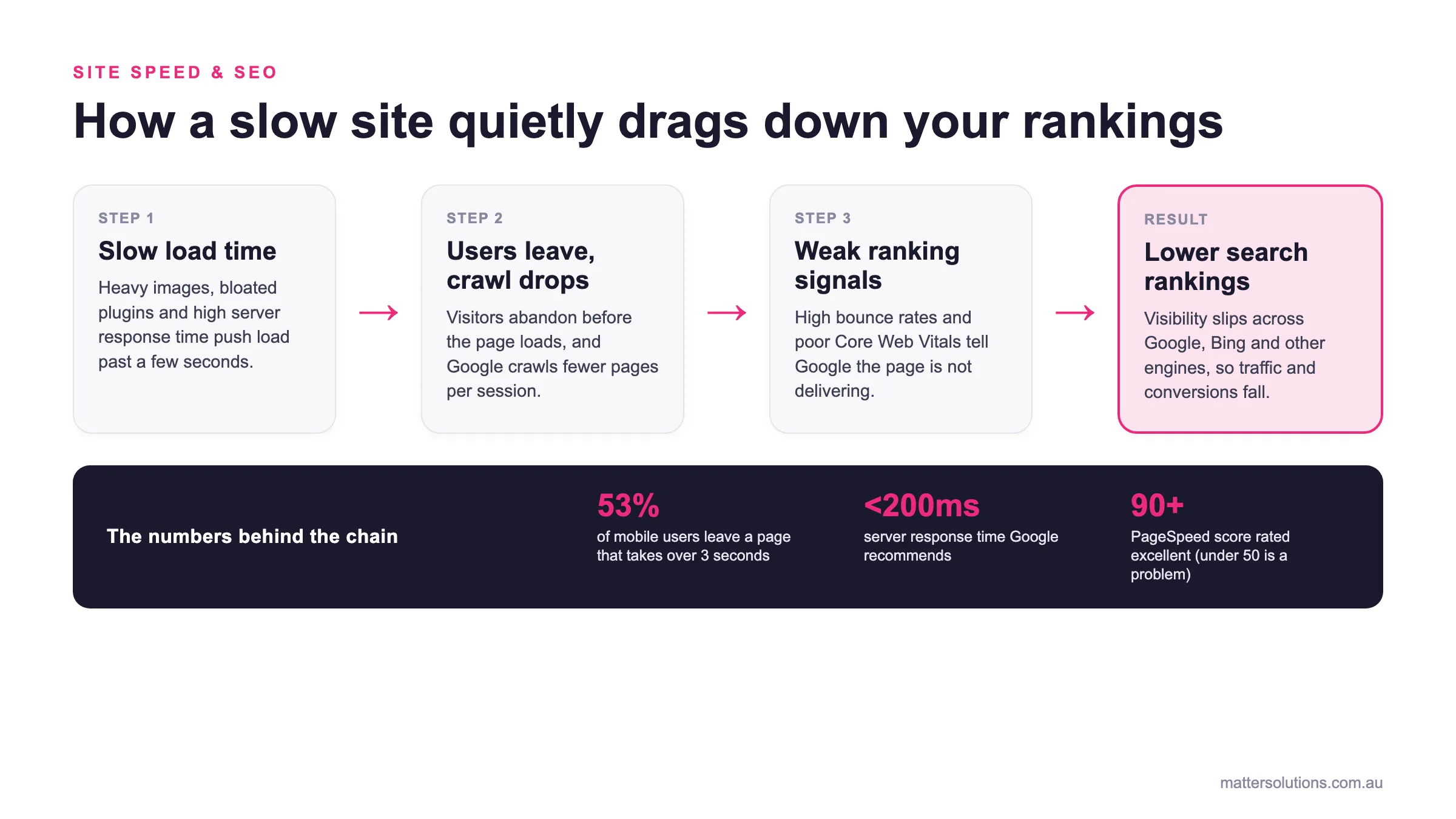
Site speed & SEO
How a slow site quietly drags down your rankings
Step 1
Slow load time
Heavy images, bloated plugins and high server response time push load past a few seconds.
Step 2
Users leave, crawl drops
Visitors abandon before the page loads, and Google crawls fewer pages per session.
Step 3
Weak ranking signals
High bounce rates and poor Core Web Vitals tell Google the page is not delivering.
Result
Lower search rankings
Visibility slips across Google, Bing and other engines, so traffic and conversions fall.
The numbers behind the chain
How slow site speed compounds into lower search rankings, and the numbers behind each step.
Site Speed and SEO: Why Google Pays Close Attention
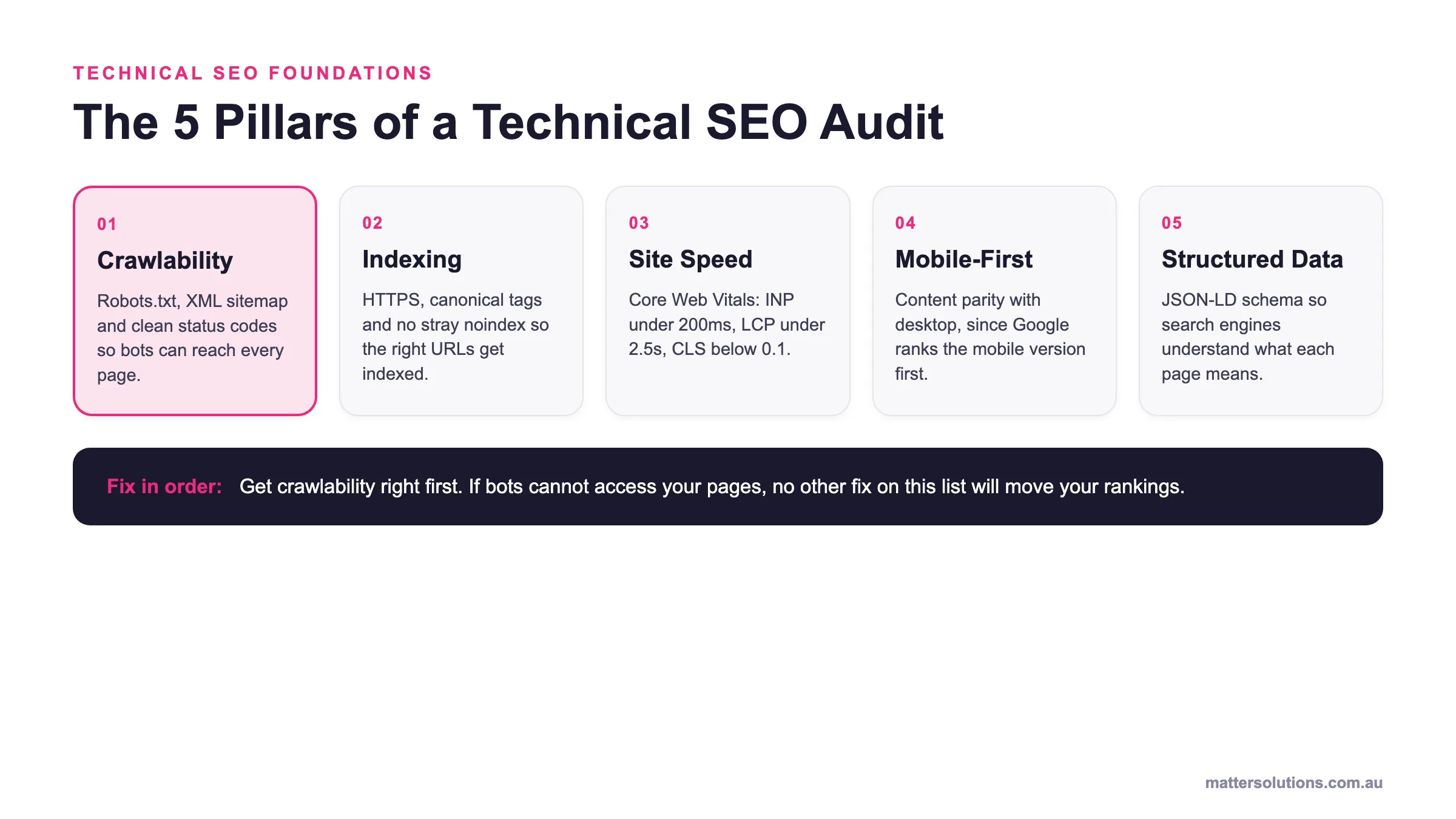
Site speed has been an official Google ranking factor since 2010. Search engines have long understood that a slow website means a poor experience, and Google isn’t shy about acting on that signal.
Here’s what most people don’t realise, though. Page speed doesn’t just affect how visitors feel when they land on your site. It also affects crawl efficiency, which is how quickly and thoroughly Google can move through your pages. If your site loads slowly, Google crawls fewer pages per session. Over time, that chips away at your visibility in search results.
Drawing from our experience, site speed carries far more weight than most businesses give it credit for. A direct ranking factor like this one isn’t something you can afford to overlook. Speed affects SEO in ways that build up quietly, and by the time you notice the drop in rankings, the damage is already done.
How Load Speed Became a Google Ranking Factor
Most businesses don’t realise how much load speed has shifted over the years. What started as a minor signal has grown into a core part of how Google evaluates your site. Page load time now plays a direct role in where your site appears in search engine rankings.
The 2021 Update That Changed the Rules
The Core Web Vitals update in 2021 was a turning point for SEO. For the first time, Google made page load speed and overall page experience an official part of its ranking system. Sites that failed the new thresholds took a hit in search rankings almost immediately.
A good real-world example is mobile-first indexing. Google started ranking pages based on their mobile version, not desktop. That meant slow mobile speed suddenly had real consequences for businesses that hadn’t prioritised it.
With that shift in place, optimising for Core Web Vitals became less of a nice-to-have and more of a necessity for staying competitive in search results.
Core Web Vitals: The Metrics That Measure Speed
Core Web Vitals are made up of three specific measurements. Each one targets a different part of how your page performs for real users.
Largest Contentful Paint, or LCP, tracks how long the largest visible element takes to load on screen. For most pages, that’s a hero image or a large block of above-the-fold content. Slow LCP scores are one of the most common issues we see across client websites.
First Input Delay measures the lag between a user’s first interaction and the browser’s response. High input delay makes a site feel unresponsive, even if it looks fully loaded. On the flip side, Cumulative Layout Shift, or CLS, goes after visual stability.
It tracks unexpected layout shifts that happen while the page is still loading. A high CLS score tells Google your page feels unstable to users, and that’s never a good look.
What a Good Speed Score Actually Looks Like
Google PageSpeed Insights scores your site from 0 to 100. A score of 90 or above is considered excellent, while anything under 50 signals serious performance problems that’ll hurt your SEO efforts.
The tool also shows lab data, including your speed index and how your page performs under controlled conditions. It’s worth checking both your desktop and mobile scores separately. Mobile devices often return lower scores, and since Google prioritises mobile-first indexing, that’s the number you want to focus on first.
Website Loading Speed and the User Experience Connection
A faster website ranks better and keeps visitors around long enough to convert. That said, most users aren’t patient, and a slow website tests that patience in ways that directly hurt your bottom line.
It’s also worth noting that page load plays a bigger role in user experience than most site owners expect. According to Think with Google, in their report ‘The Need for Mobile Speed’, 53% of mobile users abandon a page that takes longer than 3 seconds to load. That’s more than half your potential audience gone before they’ve read a single word.
And here’s where it connects back to your rankings. When bounce rates climb because of slow page load, search engines read that as a signal that your page isn’t delivering. So your visibility drops too.
A fast website flips that around by keeping people engaged longer, sending stronger signals back to Google, and building real momentum for your SEO over time.
Server Response Time: What It Is and Why It Slows You Down
Server response time is the delay between a browser request and your server’s first reply. Google recommends keeping it under 200 milliseconds, and anything beyond that starts eating into your page load time in ways that quietly compound over time.
There are a few common reasons your site loads slower than it should:
- Shared Hosting Under Heavy Traffic: Many businesses start on shared hosting because it’s affordable. The problem is that your server’s resources are split across dozens of other websites, so when traffic spikes, your overall site speed takes the hit. A site load speed drop at peak hours can cost you real visitors.
- Bloated Plugins and Unoptimised Databases: Every unnecessary plugin adds weight to your backend. Unoptimised databases slow down how quickly your server can pull and deliver information, and that directly affects your file size and response time.
- No Content Delivery Network in Place: A content delivery network stores copies of your site across multiple global servers. Without one, every user accesses your site from a single location, which stretches server response time significantly. Pairing a CDN with a cache control header and browser caching cuts that delay down fast.
We’ve tried plenty of fixes over the years, and the one thing that’s always clear is that server response time needs regular attention, especially as your site grows.
What Google Analytics Tells You About Your Load Time
Most business owners have Google Analytics set up, but very few actually check their speed data. That’s a missed opportunity, because the platform gives you a surprisingly clear window into your site’s performance.
Here’s a quick look at the key metrics you’ll find under the Site Speed reports:
| Metric | What It Measures |
|---|---|
| Average Page Load Time | How long each page takes to fully load for visitors |
| Server Response Time | The delay between a browser request and your server’s reply |
| Page Download Time | How long the browser takes to download your page |
| Redirection Time | Time spent on redirects before the page loads |
These numbers tell you a lot about your website’s performance at a glance. Page load data broken down by individual pages is where it gets genuinely useful. You can spot exactly which pages are dragging your site performance down and prioritise fixes from there.
Drawing from our experience, most businesses are surprised by how much lab data from Google Analytics lines up with what they see in Google search results.
If your page load is slow across the board, it shows up in your rankings, too. For anyone who wants to get hands-on with this data, our custom SEO training covers how to read and act on it properly.
Landing Page Speed: Does It Affect Your SEO Efforts?
Yes, landing page speed directly affects both your organic rankings and your paid campaign performance. A slow landing page does frustrate visitors. What’s more, it sends the wrong signals to search engine optimisation algorithms and wastes money at the same time.
Let’s break down exactly where that slowness hits you hardest.
How Slow Landing Pages Hurt Google Rankings
Google factors landing page experience into how it decides to rank pages, and page speed is a big part of that. A slow site with high bounce rates tells Google that visitors aren’t getting what they came for, which pushes you further down in Google rankings.
Through our hands-on experience, we’ve seen that improving page load speed on key landing pages often produces noticeable ranking gains within weeks.
That’s how directly tied user experience is to where you appear in search results. If your business is focused on conversion rate optimisation, landing page speed is one of the first things worth addressing.
Paid Traffic and the Cost of a Sluggish Page
Google Ads factors landing page experience into its Quality Score calculation. A low Quality Score means you’re paying more per click for the same ad position, and your ads reach fewer people, too.
Most website visitors arriving from paid campaigns have high intent. They’re ready to act, but page load speed on mobile devices can kill that momentum instantly. Slow pages waste a significant chunk of ad spend before a single user interaction even takes place.
Quick Fixes That Move the Needle Fast
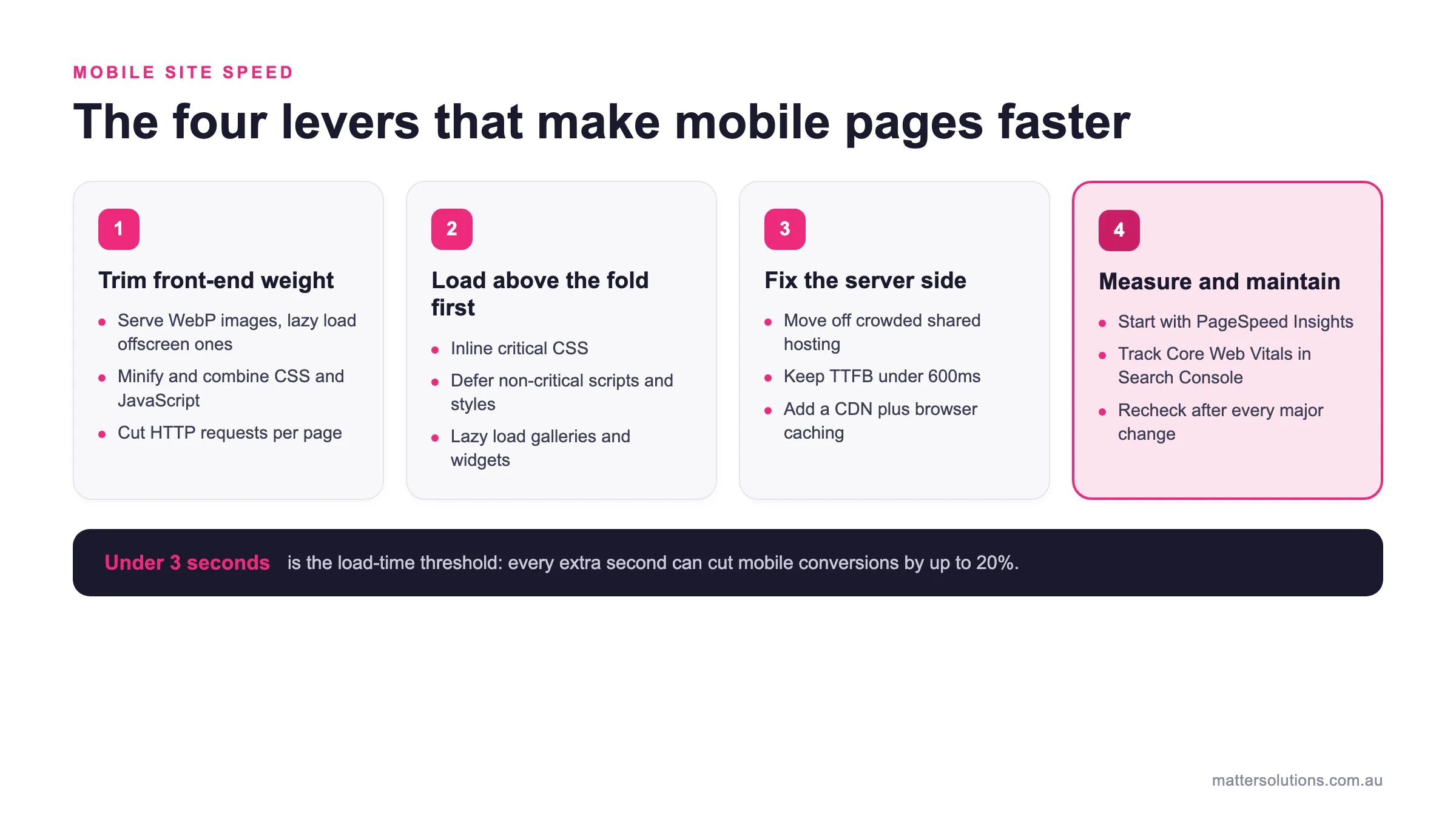
Two of the fastest wins for landing page speed are image compression and browser caching. First, let’s talk about image compression. Reducing file size without hurting visual quality is one of the simplest improvements you can make, and it pays off quickly.
Removing unused plugins and scripts is another fix that reduces how much your server has to process on each visit. That alone improves page load speed noticeably across most sites.
Accelerated mobile pages are worth exploring too, particularly if a large share of your traffic comes from mobile devices. They’re designed specifically to load faster on smaller screens and slower connections.
Search Engines Beyond Google: Do They Care About Speed Too?
Now that you know how Google treats speed, it’s worth asking whether other search engines feel the same way. The short answer is yes. Bing, DuckDuckGo, and other platforms all factor page speed into how they evaluate and rank a web page.
Bing Webmaster Tools, for instance, includes performance data that mirrors a lot of what Google recommends. Slow load times, poor mobile site performance, and low user satisfaction scores all work against you there, too.
And with mobile usage continuing to climb across every platform, a sluggish site hurts your visibility well beyond just Google search.
Here’s the part most people overlook, though. Off-page factors like backlinks and brand signals only carry you so far.
If your site loads slowly, even the most relevant content won’t hold a visitor’s attention long enough to count. Faster sites simply convert better across every search engine, and that’s a benefit your SEO efforts will feel across the board.
Your Faster Site Starts Here
A faster site means better rankings, lower bounce rates, and more conversions. Every second you shave off your load time is a second more that visitors stay, engage, and take action. That’s the kind of compounding return that makes website speed one of the most fruitful investments you can make for your SEO efforts.
A free audit is a good place to start. Tools like Google PageSpeed Insights and other speed test tools give you a clear snapshot of your overall site speed and exactly where it’s falling short. From there, the fixes are far more straightforward than most people expect.
If you’re ready to turn faster sites into real business results, our team at Matter Solutions is here to help. Get in touch, and we’ll take a look at what’s holding your site back.
Frequently Asked Questions (FAQs)
Does Page Speed Really Affect SEO Rankings?
Yes, site speed matters more than most businesses realise. Speed affects SEO across every major search engine, not just Google. Search engines use page speed as a direct signal when deciding where to rank your site in search engine optimisation results. A slow site loses ground fast, and seo search engines like Google and Bing aren’t forgiving about it.
What Is a Good Load Time For a Fast Website?
A fast website ideally loads its entire page in under 3 seconds. In reality, most users expect it in under 2. Load time directly shapes user experience, and anything beyond 3 seconds puts you at serious risk of losing visitors before your user’s browser even finishes rendering the page. Mobile speed is worth watching separately, too, since mobile load times tend to run slower than desktop.
How Do Largest Contentful Paint LCP and Cumulative Layout Shift CLS Affect My Site?
Both are part of Core Web Vitals, and both affect how Google rates your page speed and overall website’s performance. Largest Contentful Paint LCP measures how quickly the main content loads on screen. Cumulative Layout Shift CLS focuses on visual stability by quantifying unexpected layout shifts that happen while the entire page is still loading. Together, they give Google a clear picture of your user experience and page performance.
How Do I improve My Site’s Performance With Image Optimisation and Browser Caching?
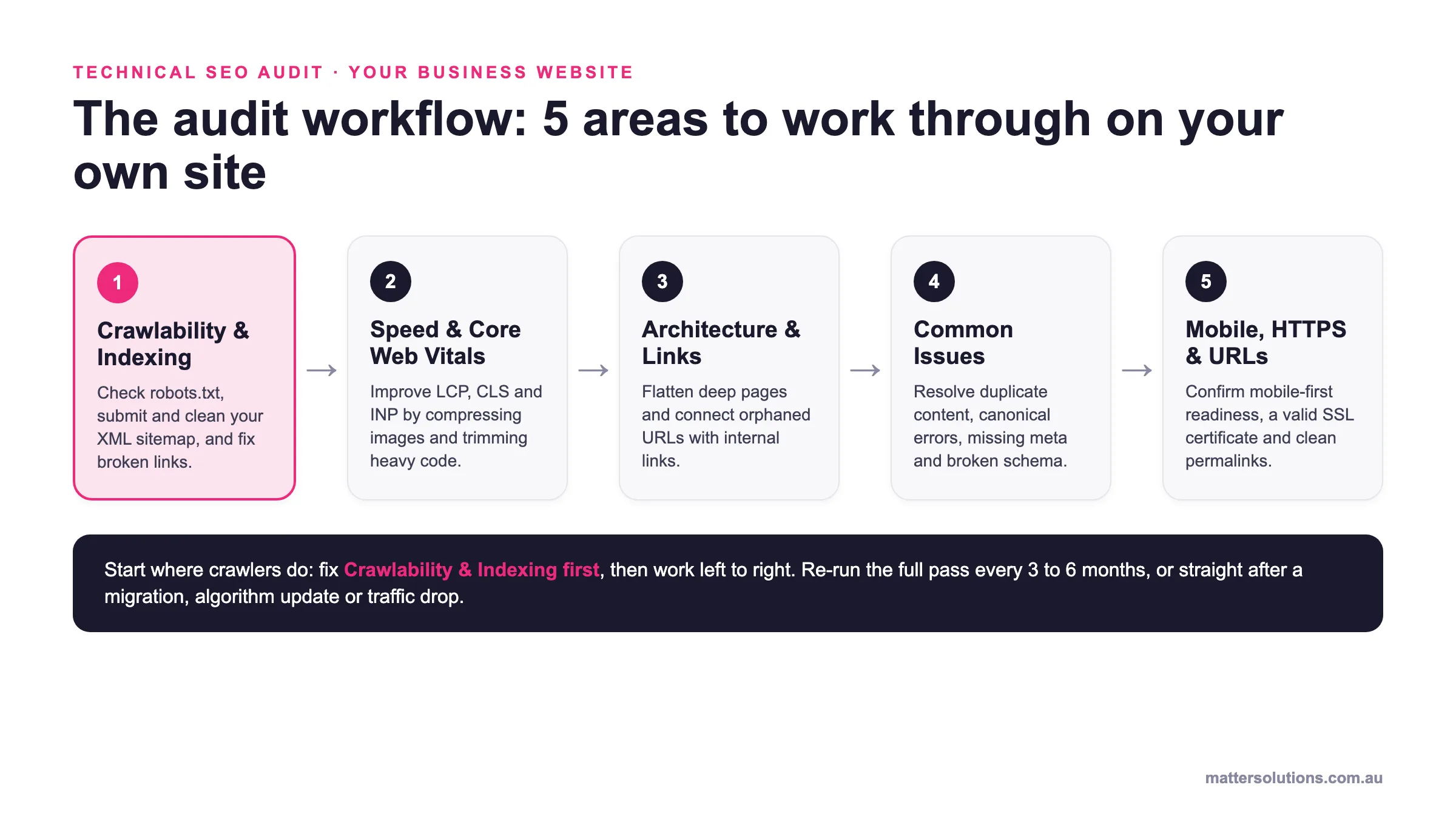
Start with image optimisation. Compressing images reduces file size significantly, and that alone can shave seconds off your load time. From there, leverage browser caching so that returning visitors don’t have to reload everything from scratch. These two fixes cover a large chunk of what technical SEO audits flag most often, and they improve crawl efficiency at the same time.
What Does Google PageSpeed Insights Show About My Site Speed?
Google PageSpeed Insights gives you a score from 0 to 100 based on your site speed and page speed across both desktop and mobile. It shows you exactly where your website’s performance is falling short, which core web vitals need attention, and what’s slowing your load time down. Site speed is important across every device, and this tool makes it easy for search engines to tell you where to start.
Need help with your digital marketing?
Book a free strategy call and let's discuss your goals.
Book a Strategy Call