Welcome to the complete guide to Google Ads keyword match types, brought to you by Matter Solutions.
We are a Brisbane based digital marketing agency, and we use data to build Google Ads campaigns that connect with the right people at the right time. Every dollar you spend should work with purpose, and it starts with understanding keyword match types.
In this guide, you will learn how every match type works, when to use each one, and how to stop paying for clicks that never convert. Let’s get into it.
Google Ads Keyword Match Types Explained
Keyword match types are settings that tell Google how closely a search query needs to match your keyword before your ad is shown. You can read more about keyword matching options directly from Google’s support page.
There are 4 match types in Google Ads: broad match, phrase match, exact match, and negative keywords. Each one controls a different level of reach, and picking the wrong one early on can quietly drain your budget before you even notice.
Below, we’ve provided a clear idea about how each one plays a role in your campaigns.
Google Ads keyword match types
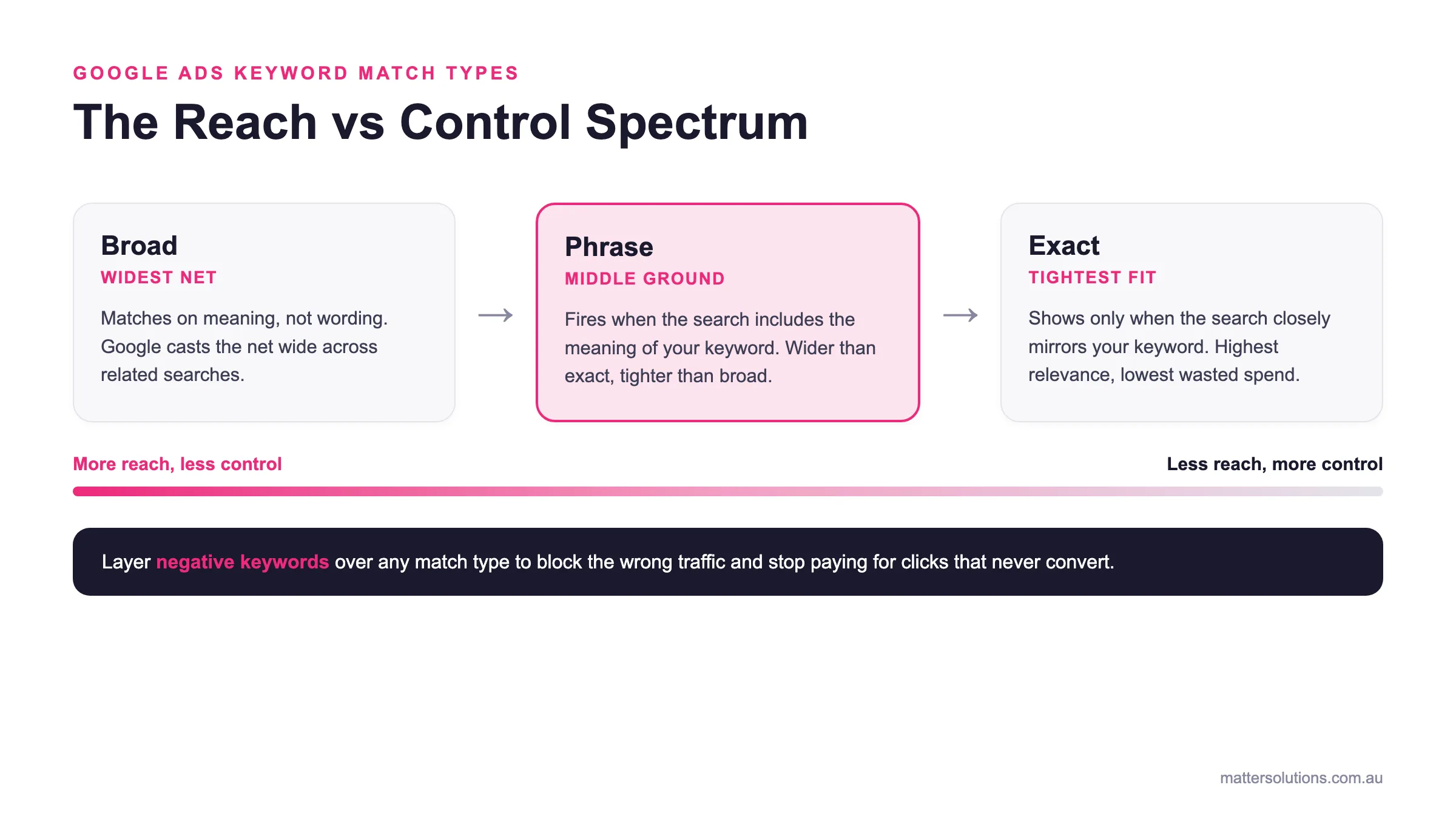
The Reach vs Control Spectrum
Broad
Widest net
Matches on meaning, not wording. Google casts the net wide across related searches.
Phrase
Middle ground
Fires when the search includes the meaning of your keyword. Wider than exact, tighter than broad.
Exact
Tightest fit
Shows only when the search closely mirrors your keyword. Highest relevance, lowest wasted spend.
More reach, less controlLess reach, more control
Layer negative keywords over any match type to block the wrong traffic and stop paying for clicks that never convert.
How Google Ads keyword match types trade reach for control, from broad through phrase to exact.
How Match Types Control Who Sees Your Ads
Think of match types as a filter sitting between your keyword list and the real searches people type into Google every day. A broad match keyword can show your ad for dozens of loosely related search terms, some of which have nothing to do with what you offer.
On the flip side, exact match locks your ad to only the most specific, intended searches with very little variation.
Why Getting This Wrong Costs You Money
Running broad match keywords without negative keywords regularly drains budget on completely unrelated searches.
Say a law firm runs a broad match without proper exclusions. They can easily burn 30-40% of their ad spend on searches like “free legal advice” or “DIY contract templates.” When that pattern repeats across multiple campaigns, the wasted spend adds up, and the results never improve.
Where Match Types Fit in Your Campaign Structure
Match types work at the keyword level inside your ad groups, not at the campaign level. So two keywords sitting in the same ad group can run on completely different match types at the same time.
Most experienced advertisers start tight with exact match, then expand outward using phrase or broad match once the data starts coming in.
| Match type | How it works | Example keyword and what it triggers | Reach vs control |
|---|---|---|---|
| Broad match | The default in Google Ads. Matches on meaning, not exact wording, so Google decides which searches trigger your ad. | commercial cleaning services triggers home cleaning tips and how to clean grout. | Widest reach, least control. Pair with smart bidding and negative keywords. |
| Phrase match | Shows your ad when the search includes the meaning of your keyword. Wider than exact, tighter than broad. | running shoes fires for best running shoes for flat feet but not shoes for running a business. | Middle ground. Consistent intent without opening the floodgates. |
| Exact match | Ad shows only when the search closely mirrors your keyword in meaning and intent. Google allows plurals and close variants. | [running shoes] triggers only the most specific, intended searches with very little variation. | Smallest reach, most control. Best conversion rates, lowest wasted spend. |
| Negative keywords | Block the wrong traffic across all match types, at campaign or ad group level. Negative phrase and negative exact available. | Exclude free legal advice so a law firm stops paying for clicks that never convert. | Adds control to any match type. One of the quickest wins in any campaign. |
Broad Match Keywords: The Widest Net You Can Cast
Broad match is the default match type in Google Ads, and most advertisers have no idea how much it’s costing them. When you add a keyword without specifying a match type, broad match kicks in automatically. From there, Google decides which searches your ad appears for, and that net gets cast very wide.
The upside is visibility. Broad match keywords can trigger your ads for a wider range of searches, including related queries and variations you may not have considered targeting.
The problem is that broad match works on meaning, not exact wording. So your ad for “commercial cleaning services” could show up for searches like “home cleaning tips” or “how to clean grout.”
That’s where unnecessary spending creeps in. Broad match works best when you pair it with smart bidding and a solid list of negative keywords to filter out the searches that’ll never convert.
Phrase Match Type: Somewhere in the Middle
Phrase match gives you the reach of broad match with enough control to avoid the traffic you don’t want. It’s the middle ground most advertisers land on once they’ve burnt enough budget on broad match to know better.
Here’s how phrase match actually works in practice:
- Meaning Over Order: Phrase match shows your ad when the user’s search query includes the meaning of your keyword, even if the exact phrase isn’t word-for-word. So a phrase match keyword like “running shoes” could fire for “best running shoes for flat feet” but not for “shoes for running a business.” You can check out Google’s full breakdown of keyword matching to see exactly how this plays out.
- Wider Than Exact, Tighter Than Broad: Phrase match reaches fewer searches than broad match but more than exact match. It’s a practical setting for advertisers who want consistent search intent without opening the floodgates completely.
- Best Fit for Most Campaigns: If you’re running search campaigns with a clear audience in mind, phrase match is usually your starting point. It keeps your keyword match tight enough to stay relevant while still capturing search queries you may not have explicitly added to your keyword lists.
Phrase match won’t solve every targeting problem, but it cuts out a lot of the noise that broad match brings in.
Exact Match Keywords: Is Tighter Always Better?
Exact match sounds like the safest option, but limiting your reach too early can starve a campaign of the volume it needs to perform. That said, when it’s used right, it’s the most precise tool in your Google Ads kit.
With an exact match, your ad only shows when the search query closely mirrors your keyword in meaning and intent. Google allows some flexibility for plural forms and close variants, but it’s still the most restrictive match type of the three.
If you want highly relevant searches and you’re not keen on paying for anything loosely related, exact match keywords are worth the trade-off.
It’s worth noting that the exact match type requires more individual keywords to cover the same ground that broad or phrase match handles with fewer. If you’re new to PPC advertising, our digital marketing workshop covers the fundamentals well.
Take a look at where exact match wins and where it falls short:
| Pros | Cons |
| Highest ad relevance | Smallest reach of all match types |
| Best conversion rates | Misses valuable search variations |
| Full control over who sees your ad | Needs a larger, more detailed keyword list |
| Lowest wasted spend | Can underdeliver in low-volume niches |
| Easiest to analyse and optimise | Slower data collection due to limited impressions |
Long story short: Exact match works best when you already know which keywords convert. It’s not the place to start from scratch, but it’s where the most serious advertisers end up.
How to Change Keyword Match Type in Google Ads
You can change a keyword match type in Google Ads in under a minute, directly from the Keywords tab. It’s a straightforward process, and you don’t need to delete and recreate your existing keywords to do it.
Here’s how to get it done:
- First, sign in to your Google Ads Account and head to the campaign you want to edit.
- After that, click on Keywords in the left-hand menu to pull up your full keyword list.
- Now, find the keyword you want to change and click the pencil icon to edit it.
- Then, add or remove the relevant syntax: square brackets for exact match, quotation marks for phrase match, or no punctuation at all for broad match.
- Finally, hit Save, and your updated match type kicks in straight away.
One thing to keep in mind: changing match types on existing keywords won’t reset your performance data. Your historical stats stay intact, but you’ll likely see a shift in how your search campaigns perform once the change goes live.
If your ad groups have multiple keywords running, check for overlap after switching, as two keywords on different match types can sometimes end up competing for the same search queries.
Negative Keyword Match Type: Block the Wrong Traffic
Negative keywords are the fastest way to stop paying for clicks that were never going to convert. Most advertisers set up their match types, launch their campaigns, and forget this step entirely. That’s usually when the budget starts disappearing on searches that have nothing to do with the business.
Here’s the thing: negative keywords work across all match types, and you can apply them at either the campaign or ad group level. Campaign-level negatives block irrelevant searches across every ad group inside that campaign, while ad group-level negatives give you tighter, more specific control.
There are two negative keyword match types to know about: negative phrase match and negative exact match. Among these, a negative phrase match blocks any search containing your excluded term anywhere in the query. In contrast, a negative exact match only blocks searches that mirror your excluded term precisely.
For a broader look at how keyword match types work together, Google’s own resource lays it out well. Avoiding unnecessary spend starts here, and it’s one of the quickest wins available in any PPC campaign.
Using a Keyword Match Type Tool to Build Smarter Lists
Building keyword lists manually across every match type takes hours. The right keyword match type tool cuts that down to minutes and gives you a much cleaner starting point for your campaigns.
Let’s break down what these tools bring across three main areas.
What the Right Keyword Match Tool Does for You
A good keyword match type tool converts a single seed keyword into a full list across all three match types in one go. Plus, overlaps that cause internal ad competition are easy to miss when building lists manually.
Some tools even flag which match type combinations work best for specific industries or campaign objectives, saving you a lot of trial and error. That’s the kind of insight that takes weeks to figure out manually.
How to Build Keyword Lists That Actually Convert
Start with your highest-intent exact match keywords, then layer phrase match on top to capture related search queries you may have missed. Group your keywords by intent, not just topic, so each ad group targets one clear audience need.
Don’t forget to review your search terms report weekly to find new keywords worth adding and irrelevant searches worth excluding. You can use Google’s keyword planner as a solid starting point for building and organising your lists.
Broad vs. Exact: Picking the Right Tool Setting
Most keyword match tools let you toggle between match types so you can preview reach estimates side by side. Exact match settings show tighter search volumes, which reflect more realistic conversion potential for your PPC campaigns.
Use broad match settings for discovery, then narrow things down to phrase or exact match for your active search campaigns.
These well-regarded tools are worth checking out:
Google Ads Keyword Match Type Changes: What’s Different Now?
Now that you know how each match type works, it helps to understand how Google has changed the rules over time. And these aren’t minor tweaks either. Some of the shifts have fundamentally changed how match types affect the reach and relevance of your search ads.
Here’s a quick rundown of the most important changes:
- Broad Match Modified Is Gone: In 2021, Google retired the broad match modified match type entirely. Its functionality was folded into phrase match, which now covers a wider range of search queries than it used to. For a detailed breakdown of how this played out, WordStream’s query matching updates page covers it well.
- Exact Match Now Allows Close Variants: Exact match used to mean exactly that. These days, Google runs exact match keywords on close variants too, so plurals, misspellings, and words with the same meaning can all activate your keyword. It’s a broader definition of “exact” than most advertisers signed up for.
- Phrase Match Picked Up the Slack: With the broad match modified gone, phrase match now does a lot of the heavy lifting in the middle ground. It matches in meaning, not just word order, which gives it more flexibility than the old phrase that plenty of campaigners were used to.
However, staying on top of these Google Ads keyword match type changes isn’t optional if you want your campaigns to perform the way you intend. What worked two years ago may be pulling in very different searches today.
Make Every Click Work Harder for You
Many accounts set up their match types once and never look back. That’s usually where the budget leaks start. Getting this right isn’t a one-time job; it’s an ongoing process that pays off every single time you check your search terms report and make a smart call.
Here’s what we’ve seen after running Google Ads campaigns since 2008: the accounts that perform best aren’t always the ones with the highest budgets. They’re the ones where every keyword has a purpose, every match type is set with intent, and wasted spend gets cut before it becomes a habit.
At Matter Solutions, we’ve helped businesses across Australia stop burning money on the wrong clicks and start bringing in the right ones. If that sounds like something your campaigns need, contact us and let’s sort it out together.
Frequently Asked Questions
What Are the Three Keyword Match Types in Google Ads?
The three keyword match types in Google Ads are broad match, phrase match, and exact match. Broad match is the default keyword match type, casting the widest net across related searches.
On the other hand, phrase match and exact match give you progressively more control over which search queries match your ads.
How Do Keyword Match Types Affect My Ad Auction?
Different keyword match types determine which searches enter your ad auction and how competitive your bids need to be. Narrower options, like exact-match limits, restrict entry to highly relevant searches, while broader types open things up considerably.
The right balance directly impacts your cost per click and campaign efficiency.
How Do I Add Keywords With Different Match Types in Google Ads?
Head to the Keywords tab inside your ad group and click the blue plus button to add keywords. Use square brackets for exact match, quotation marks for phrase match, and no punctuation for broad match keywords.
Before you add a keyword phrase, check for the same keyword already sitting in other ad groups to avoid your ads competing against each other in search results.
What is the Difference Between Broad Match and Phrase Match Keywords?
Broad match keywords show your ads on searches Google considers related to your keyword terms, even without your exact keyword phrase present. Phrase match is tighter, only showing ads when the search includes the meaning of your keyword in a relevant context.
If you want more control over ad targeting and irrelevant clicks are eating your budget, phrase match is the smarter starting point.
What is a Keyword Match Type Tool, and Do I Need One?
A keyword match type tool formats and organises your keyword research across all match types quickly, saving hours of manual work. It also flags other keywords and similar keywords already in your account that could cause ad text duplication or overlap across ad groups.
For anyone managing more than one search campaign, a keyword match tool is well worth using.
Should I Use Smart Bidding With Broad Match Keywords?
Yes, Google recommends pairing Smart Bidding with broad match for good reason. The algorithm uses search query context, location, and audience signals to focus your spend on the right searches and cut irrelevant clicks automatically.
Strategies like maximising conversions or target CPA perform best when broad match feeds the system enough data to optimise against.
Need help with your digital marketing?
Book a free strategy call and let's discuss your goals.
Book a Strategy Call