Running ads on Google sounds easy enough. You create an account, pick some keywords, write a few headlines, and wait for customers to roll in. However, it doesn’t work that way for most small businesses starting out.
The truth is, Google Ads can drain your budget quickly if you don’t know what you’re doing. One wrong setting, a few broad keywords, or skipping conversion tracking, and suddenly you’ve spent $2,000 with nothing to show for it. So, it’s natural to feel overwhelmed when you’re trying to figure out how to advertise on Google Ads without burning money.
This guide walks you through the setup process from creating your account to launching your first campaign. We’ll cover Google Ads pricing, how much ad spend to expect, and the mistakes that waste budgets in digital marketing.
Let’s get into it.
What Is Google Ads?
Google Ads is Google’s paid search platform that puts your business at the top of search engine results when people look for what you sell. You bid on keywords, write ads, and pay only when someone clicks. That’s the basic model.
When someone searches “emergency plumber Brisbane,” the platform runs an auction among advertisers bidding on that keyword. Google marks the winners as ‘Sponsored’ above organic results. You can also display your ad across the Display Network, which includes:
- Millions of websites
- YouTube
- Gmail
- Other partner apps
The platform generates web traffic faster than SEO because you’re buying placement instead of earning it. Bing Ads works similarly but reaches a smaller audience. Most businesses focus on Google since it handles over 8.5 billion searches daily. That volume alone makes it the primary platform for online sales and lead generation.
Why Advertise on Google?
Google Ads reaches people at the exact moment they’re searching for what you sell. Someone typing “divorce lawyer Sydney” wants help now. And if your ad appears at that exact moment, there’s a strong chance they’ll click and contact you.
These three factors make it worth the investment:
- Reach Customers at the Right Moment: Your ad appears when purchase intent is highest, unlike social media, where you’re interrupting people scrolling through cat videos. This timing advantage explains why digital marketing budgets flow heavily towards search advertising.
- Control Your Spending: The auction system lets you set daily limits and adjust anytime (and yes, you can pause campaigns anytime). Google never locks you into long contracts or minimum spends. Most businesses spend what makes sense for them, whether that’s $10 daily or $10,000.
- Track Results in Real Time: The dashboard shows exactly which keywords drive calls, form fills, or purchases. These results appear within hours, so you can double down on winners and kill what’s bleeding money. That speed lets you fix problems fast instead of waiting weeks to see if something works.
When you combine precise timing with budget flexibility and real-time data, the platform starts making sense for most businesses. But before you jump in and start spending, there are two things you need in place first.
What Do You Need Before Running Google Ads?
Can you launch a campaign without a working website and conversion tracking? Technically, yes, but you’ll burn money without knowing what works. Here’s what you actually need:
A Working Website
Your website is where ad traffic lands, so it needs to load fast and work flawlessly on mobile. We suggest testing your site on a phone before spending a dollar on Google Ads. After all, pages that take more than 3 seconds to load will lose 53% of visitors.
What’s more, Google reviews the landing page experience as part of your ad quality score. Poor experiences mean higher costs and lower placement. That’s why your landing page should match what the ad promises. So, if someone clicks “free quote,” they better land on a quote form, not your homepage.
Conversion Tracking
Without tracking, your campaign is just guesswork. You need to know which keywords drive phone calls, form submissions, or sales to avoid burning through your budget on clicks that go nowhere.
Helpful Tip: Install Google Tag Manager and set up conversion goals before running Google Ads. Track actions that actually move your business forward, whether that’s a purchase, lead, or phone call.
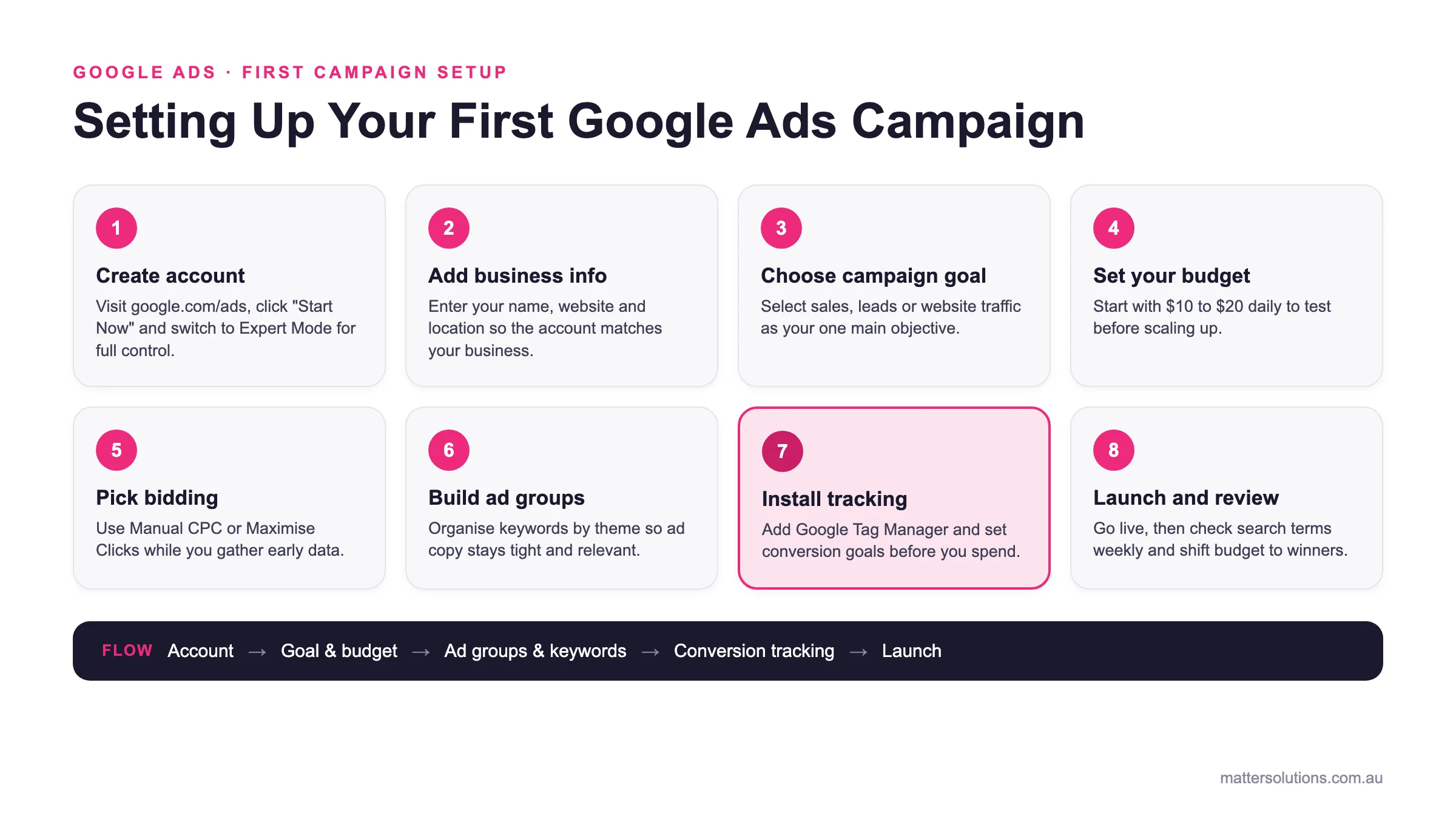
Google Ads: first campaign setup
Setting Up Your First Google Ads Campaign
Create account
Visit google.com/ads, click “Start Now” and switch to Expert Mode for full control.
Add business info
Enter your name, website and location so the account matches your business.
Choose campaign goal
Select sales, leads or website traffic as your one main objective.
Set your budget
Start with $10 to $20 daily to test before scaling up.
Pick bidding
Use Manual CPC or Maximise Clicks while you gather early data.
Build ad groups
Organise keywords by theme so ad copy stays tight and relevant.
Install tracking
Add Google Tag Manager and set conversion goals before you spend.
Launch and review
Go live, then check search terms weekly and shift budget to winners.
Flow: Account → Goal & budget → Ad groups & keywords → Conversion tracking → Launch
The core sequence for launching your first Google Ads campaign, with conversion tracking set up before you spend.
How Do You Create a Google Ads Account?
Visit the Google Ads homepage, click “Start Now,” and follow prompts to enter your business name and website. The platform will walk you through basic setup, asking for billing details and your first campaign goals.
Once you’re in, switch to Expert Mode instead of Smart Campaigns to access full control over keywords, budgets, and targeting. While Smart Campaigns sound appealing, they limit what you can adjust.
Still, if you’re unsure where to start, follow this checklist and tick off each step as you go:
| Step | What to Do | ✓ |
| Create account | Visit google.com/ads and click “Start Now” | |
| Switch to Expert Mode | Avoid Smart Campaigns for better control | |
| Add business info | Enter name, website, location | |
| Set up billing | Add payment method (credit card or bank account) | |
| Choose campaign goal | Select sales, leads, or website traffic | |
| Set Google Ads budget | Start with $10-20 daily to test | |
| Pick bidding strategy | Use Manual CPC or Maximise Clicks at first | |
| Install tracking code | Add Google Tag Manager to your site |
In our experience managing Google Ads since 2008, we’ve seen that most businesses see better results when they control their own account settings rather than letting automation handle everything from day one.
What Are the Different Campaign Types?
Google offers six campaign types: Search, Display, Video Ads, Shopping Ads, App Campaigns, and Performance Max. Among these options, three account for most of the results small businesses see.
And in this section, we’ll break down each one:
| Campaign type | Best for | Good to know |
|---|---|---|
| Search | Leads or sales from people ready to buy right now | Text ads at the top of results; you pay only when someone clicks |
| Display | Building brand awareness and reaching people browsing content | Image and banner ads across millions of sites, YouTube and news pages |
| Performance Max | Businesses with at least 30 conversions monthly | Google auto-tests assets across all networks; needs conversion data to work well |
1. Search Campaigns
As we already covered, Google displays search ads at the top of the results when someone types in relevant keywords. From there, you write ad copy with headlines and descriptions that match what people are searching for. The platform shows your ad to users entering search terms that trigger your keywords, and you pay only when they click.
However, ad quality affects your position and cost, so keeping your message tight and relevant helps you rank higher without spending more. This format works best when you want leads or sales from people ready to buy right now.
2. Display Campaigns
If you want to build brand awareness and reach people browsing content online, Display campaigns are your answer. These ads use images and banners that show across the Display Network, which includes millions of websites, YouTube, and news sites (think banner ads on news websites or YouTube).
On the other hand, video ads play before or during content, grabbing attention visually instead of through text. They target your audience based on interests, demographics, or websites they visit, even when they’re not actively searching for you.
3. Performance Max
After managing hundreds of campaigns across different industries, we’ve found that Performance Max works best for businesses with at least 30 conversions monthly.
Once you finish setup, Google tests combinations of your images, headlines, and descriptions across all networks to find what converts.
The algorithm handles several things automatically:
- Ad Placement Everywhere: Google tests every channel and prioritises the ones converting best for your business.
- Bidding Adjusts Automatically: Bids rise or fall in real time based on each user’s likelihood to convert.
- Relevance Gets Optimised: Winning ad combinations show more often while poor performers get dropped from rotation automatically.
- Budget Distributes Smartly: Money flows toward high-performing channels instead of being split evenly across all networks each week.
Beyond that, you upload assets, set goals, and let automation run. It sounds simple, but without conversion data to guide it, the system makes expensive guesses instead of smart decisions.
How Do You Structure a Google Ads Campaign?
Campaigns control your budget, location targeting, and overall goals. So each of them should focus on one main objective, whether that’s driving sales, generating leads, or building awareness.
Inside those campaigns, you create ad groups that organise target keywords by theme. For example, a plumber might have one ad group for “emergency repairs” and another for “new installations.” This organisation directly impacts performance.
Tight ad groups basically keep your ad copy relevant to what people search. When someone types “blocked drain Brisbane,” they should see an ad specifically about drain clearing, instead of a generic plumbing ad. That relevance boosts your quality score, which lowers costs and improves placement.
You’ll still need to keep an eye on how ad groups perform against each other and adjust budgets toward winners. After all, shifting money from underperformers to top performers is how you scale results without inflating spend.
Worth Noting: Your campaigns should run only when you’re able to answer calls or process orders. Ad scheduling lets you control when your ads appear, so you don’t waste budget when your business is closed.
What Keywords Should You Target?
Your keyword selection depends on how specific you want to be and how much competition you’re willing to face. Start by using Google’s Keyword Planner to check search volume and competition levels before committing.
When choosing, target keywords with decent volume but manageable competition (unless you have deep pockets to outbid everyone). Competitive keywords cost more per click, but they also bring more traffic when you rank.
Other than these standard options, you can try two smarter approaches:
Long Tail Keywords
Long tail keywords are longer, more specific phrases that capture people ready to take action right now. These phrases contain three or more words and target a clear intent. So instead of bidding on “plumber” (which costs $15+ per click and attracts browsers), you bid on “emergency blocked drain plumber Brisbane northside” for $4 per click.
They face less competition because fewer advertisers bother with them, yet they convert better since search volume reveals genuine buyer intent. Someone typing a detailed phrase knows exactly what they want.
The cost per click drops while conversion rates climb, which makes these the best starting point for tight budgets. In short, specificity saves money and delivers better leads.
Negative Keywords
Adding negative keywords stops your ads from showing for irrelevant searches that waste money without converting. But how do you identify them?
For starters, add “free” as a negative keyword, and your ad won’t appear when people search for free versions of your service. Plus, review your search terms report weekly to spot irrelevant keywords draining your ad budget.
Most people focus only on what to target and ignore what to block. One client was losing $300 monthly on searches for “DIY plumbing tips” until our team at Matter Solutions added “DIY” as a negative. Those clicks never converted because searchers wanted advice, not a plumber.
Honestly, blocking the wrong traffic protects your investment just as much as attracting the right traffic.
How Do Match Types Affect Your Ads?
Match types are settings that tell Google how closely a search needs to match your keyword before triggering your ad. In practice, these settings control how much money you spend and who sees your ads.
Google Ads offers three main options, and they work very differently:
- Exact Match: This targets specific keywords and close variations, so you control exactly when ads appear. Someone searching “Brisbane dentist” triggers your ad for “dentist Brisbane” or “dentists in Brisbane,” but not “dentist reviews.” You pay only for relevant keywords that match intent closely.
- Phrase Match: Your ads show for searches containing your keyword phrase in any order, with extra words before or after allowed. For instance, target keywords like “wedding photographer” trigger ads for “affordable wedding photographer Sydney” or “wedding photographer packages.” This balance gives you more traffic than an exact match while filtering out completely unrelated search terms.
- Broad Match: Broad match triggers for loosely connected searches that rarely convert. A keyword like “accountant” could show ads for “accounting software,” or “do my own taxes.” However, this option only works when you have enough conversion data to teach Google which searches actually lead to sales. Otherwise, you’ll spend money on clicks that never convert.
Most businesses start with an exact match to control ad spend, then expand to phrase match once they know which keywords deliver results.
Ad Extensions That Improve Performance
Ad extensions are add-ons that display extra business information like phone numbers, locations, and additional links beneath your ads. You have a few options to choose from:
- Sitelinks send users to specific pages on your site
- Callouts highlight benefits like “24/7 service” or “free quotes.”
- Structured snippets showcase your service categories
- Location extensions show the business address and map pin
Extensions boost your click-through rate because larger ads grab more attention on search results pages.
So when more people click, Google sees your ad as relevant and rewards you with a higher quality score. That improved score lowers your cost per click while pushing your ad higher on the page.
How Do Landing Pages Affect Performance?
Campaigns using dedicated landing pages see roughly 25% higher success rates than those directing traffic to general pages. Because people click your ad expecting to see exactly what you promised, instead of a generic page with five different services and a navigation menu.
That’s why your landing page should focus on one action, match your ad’s message, and remove distractions. When someone searches “free roof inspection,” they need to arrive at a page about free inspections, not your company history.
Beyond conversions, Google measures landing page experience as part of your quality score calculation. Pages that load slowly, confuse visitors, or don’t match the ad hurt your score. That penalty increases your cost per click and drops your ad rank, which means you pay more for worse placement.
Bottom Line: A focused page converts visitors, while a generic one sends them back to Google, where your competitors get a second chance.
How Much Does Google Ads Cost?
Google Ads cost varies wildly depending on your industry, keywords, and competition. There’s no fixed price, and what businesses spend depends entirely on what they’re bidding on.
The reasons behind these price differences come down to three factors:
- Industry Competition Drives Price: Competitive industries like legal services and insurance marketing see the highest expenses because competition is fierce. Average cost per click (CPC) in these fields can even hit $50+ per click. On top of that, highly competitive keywords push prices up because advertisers keep outbidding each other.
- You Control the Budget: You set a monthly spending limit, and Google won’t exceed it, so you stay in control. But check your budget report weekly to see where money goes and which campaigns deliver results.
- Bidding Affects What You Pay: Your quality score, ad relevance, and bidding strategy all impact the final cost per click CPC you pay. Even two advertisers targeting the same keyword can pay vastly different amounts. The one with better ads and a stronger landing page pays less.
Understanding cost is one thing, but knowing what drives that cost is what separates expensive campaigns from profitable ones.
What Is Quality Score?
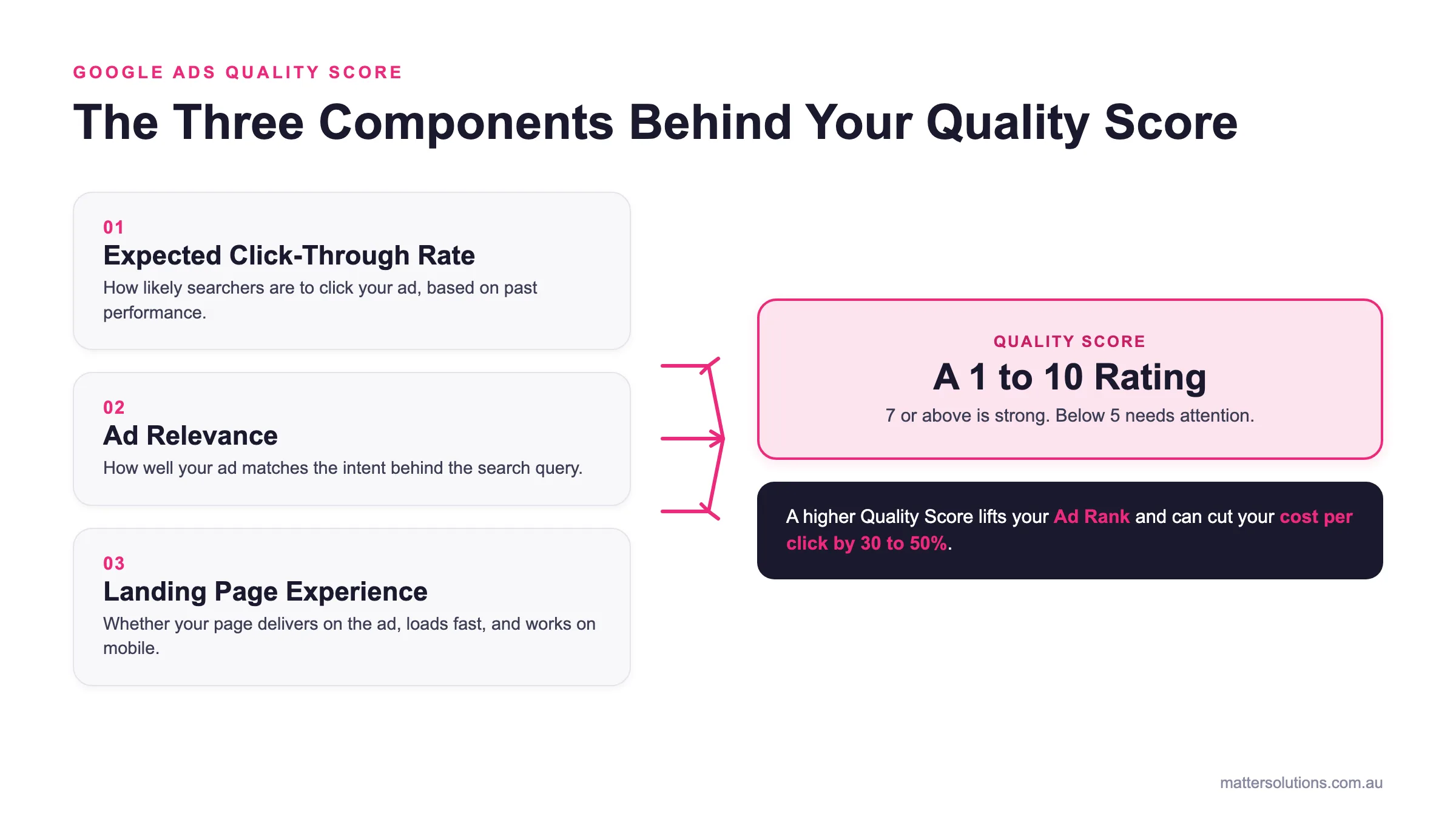
Quality Score is Google’s rating system that decides how much you pay per click and where your ads appear. The platform uses a formula that combines ad relevance, expected click-through rate, and landing page experience to calculate the score.
This score runs from 1 to 10, with 10 being perfect. Basically, Google Ads determines your ad rank by multiplying your maximum bid by your ad’s score.
The calculation looks like this: Maximum Bid × Quality Score = Ad Rank
A high Quality Score means you pay less while ranking higher than competitors who bid more but have lower quality. For example, an advertiser with a Quality Score of 8 can outrank someone with a 4, even when bidding 30% less. This better ad rank comes from Google rewarding relevant ads that users actually want to click.
What Mistakes Should You Avoid?
Now that you know how to set up campaigns, let’s break down where most beginners go wrong and burn through their budget too quickly.
- Skipping Conversion Tracking: Running Google Ads without tracking is like driving blindfolded. You can’t tell which campaigns generate sales or leads.
- Using Only Broad Match Keywords: Broad match burns ad budgets by showing ads for irrelevant searches. Which is why you should start with an exact or phrase match. This approach keeps ad costs under control while you learn which keywords bring real buyers instead of browsers.
- Using Automated Bidding Too Early: If you’re just launching your first campaign, you won’t have enough conversions for Target CPA or other smart bidding strategies to function properly. Without data, automated bidding makes expensive guesses. We recommend starting with manual bidding, collecting data for 4-6 weeks, then automating once Google knows your maximum bid sweet spot.
- Sending Traffic to Your Homepage: Create focused landing pages that match each ad’s message and remove distractions to improve conversions. When each ad points to a specific, relevant page, people can quickly find what they’re looking for and take action.
If you avoid these traps and follow the steps we’ve covered, you’ll be better positioned than most businesses just starting.
Taking the First Step
Google Ads is a digital marketing channel that rewards patience, testing, and paying attention to what the data tells you.
If you’re thinking about getting started, begin with a realistic budget you can afford to test for at least three months. Most businesses need $300-500 monthly to gather enough data and see what actually works.
At Matter Solutions, we’ve been running SEO and Google Ads campaigns for Australian businesses since 2008, and the pattern stays the same. Businesses that start with clear tracking and a sustainable monthly budget see results within 8-12 weeks.
Want help setting up your first campaign properly? Contact us for a strategy session, and we’ll show you how to avoid the expensive mistakes most beginners make.
FAQs
We hear these questions from business owners all the time. So we’ve pulled together the most common ones and answered them here:
Do I Need a Google Ads Expert to Run Campaigns?
You don’t need a Google Ads expert to start, but having one helps avoid costly mistakes. That said, beginners can run campaigns successfully by focusing on high-quality ads, relevant keywords, and tracking results. Beyond that, experts speed up the learning curve and maximise your average daily budget efficiency.
Is Google Ads Worth It for Small Businesses?
Google Ads’ worth depends on your goals and how much you spend on Google Ads monthly. Most small businesses need $300-500 to gather data. When you target consumer trends and monitor average CPC, campaigns typically break even within 8-12 weeks before becoming profitable.
How Does Google Calculate My Ad Costs?
Google uses a formula that multiplies your maximum bid by Quality Score to determine ad rank. Your average CPC depends on competition, ad relevance, and how well your keywords match what your target audience searches. And better scores mean lower costs, even against higher bidders.
Need help with your digital marketing?
Book a free strategy call and let's discuss your goals.
Book a Strategy Call