Welcome to the complete checklist of technical SEO for Australian businesses.
You might have great content and solid backlinks, yet your pages still are not ranking where they should. More often than not, the issue is technical. In reality, search engines cannot rank what they cannot properly access, and that is a problem thousands of businesses are dealing with right now.
At Matter Solutions, we have spent over two decades helping businesses across Australia uncover and resolve technical issues dragging down their organic performance. This guide walks you through exactly how to fix them.
Here’s what you will learn:
- What a technical SEO audit involves and why it deserves your attention
- How to configure your robots.txt file, XML sitemaps, and site architecture
- Three Core Web Vitals benchmarks (INP, LCP, and CLS)
- How to run a full site audit and which tools to use
- A complete technical SEO checklist you can save and work through
Let’s get into it.
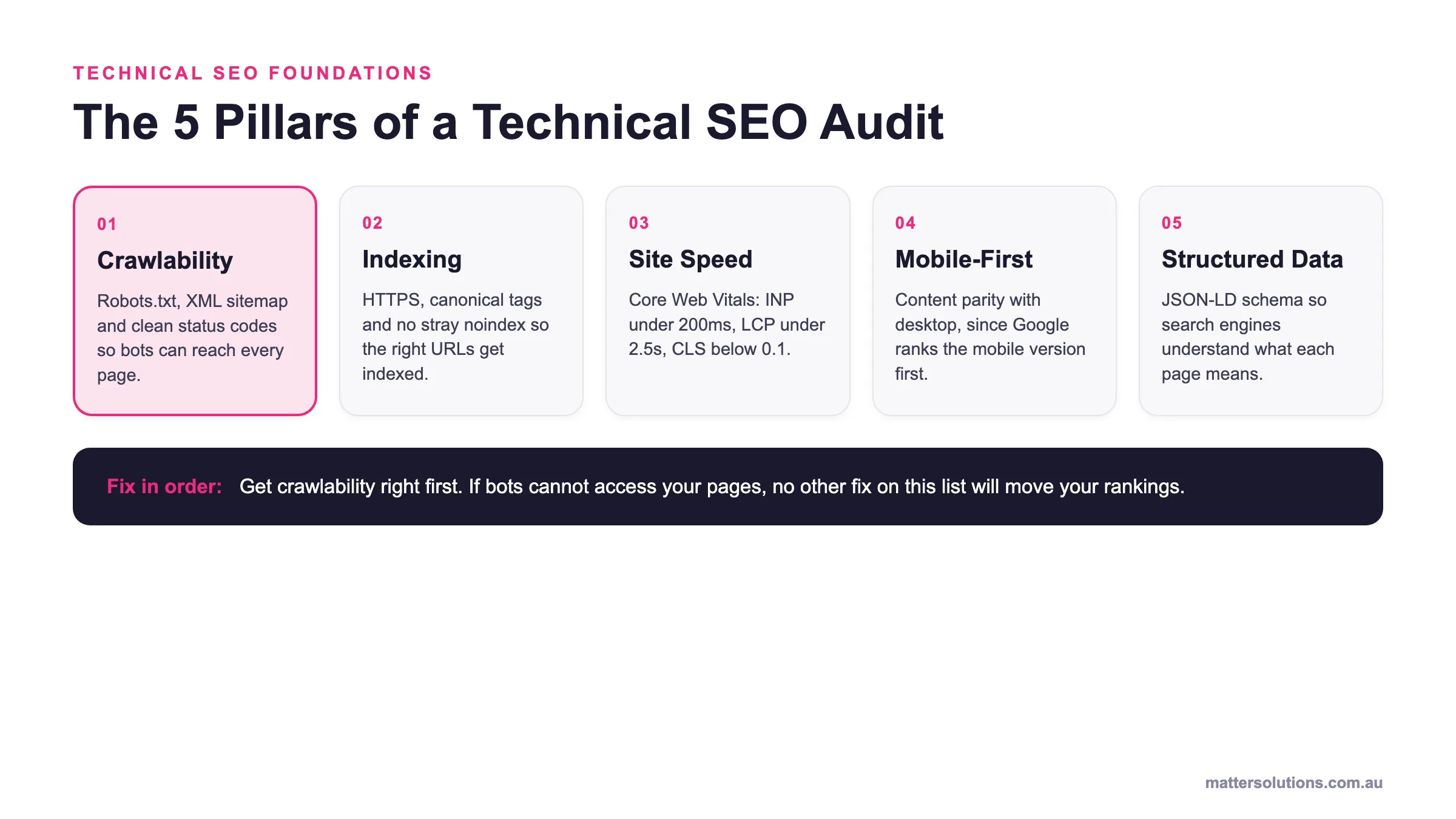
Technical SEO foundations
The 5 Pillars of a Technical SEO Audit
Crawlability
Robots.txt, XML sitemap and clean status codes so bots can reach every page.
Indexing
HTTPS, canonical tags and no stray noindex so the right URLs get indexed.
Site Speed
Core Web Vitals: INP under 200ms, LCP under 2.5s, CLS below 0.1.
Mobile-First
Content parity with desktop, since Google ranks the mobile version first.
Structured Data
JSON-LD schema so search engines understand what each page means.
Fix in order: Get crawlability right first. If bots cannot access your pages, no other fix on this list will move your rankings.
The five pillars of a technical SEO audit, in the order you should fix them.
What Is a Technical SEO Audit?
A technical SEO audit is a structured review of your website’s backend that identifies issues preventing search engines from crawling, indexing, and ranking your pages.
Most business owners jump straight to content and backlinks when rankings drop. That is understandable, but technical issues are often the real culprit. After all, search engine crawlers need a clean, accessible site before anything else can work.
In practice, a technical SEO audit checklist covers page speed, crawl errors, redirects, broken links, and structured data. So rather than guessing why the rankings have stalled, a proper audit gives you concrete answers about what is holding your site back.
Why Do Search Engines Need a Technically Sound Website?
Without a technically sound website, even your best content has little chance of ranking in search.
This is where most businesses go wrong. They pour time into content and backlinks, while Google’s crawlers are actually evaluating your site’s technical foundation first. Simply put, if your site is difficult to access, search engines will not bother ranking it.
For example, issues like a slow server response time, a broken redirect, or a misconfigured robots.txt file can all stop pages from reaching the index entirely (and yes, a single misplaced line in the configuration can wipe out entire sections of a site).
Beyond that, strong content cannot compensate for poor technical health. Search engine visibility starts with giving crawlers a clear, unobstructed path through your site. Without that, your search results performance will always hit a ceiling.
From what we have seen across hundreds of site audits, the businesses ranking consistently are the ones who treat technical SEO as a non-negotiable foundation, rather than an afterthought.
How Do You Configure Your Robots.txt File Correctly?
Start with your robots.txt file, because it is the first thing crawlers read when they reach your site. This small text file tells search engine bots which parts of your site to access and which to skip. Get it wrong, and you could be blocking Google from relevant pages you actually want ranked.
Here’s what a correctly configured file actually controls.
Blocking the Right Directories
Correct directory blocking keeps crawlers focused on pages that directly affect search rankings. So keep all public-facing pages open to crawlers.
Your robots.txt file should block:
- Admin pages
- Staging areas
- Login directories
- Parameter-based URLs
These areas add zero SEO value but consume crawl budget when you leave them open. More importantly, a single misplaced Disallow directive can remove entire site sections from Google’s index without showing any errors in Google Search Console (GSC).
Referencing Your XML Sitemap
Think of your XML sitemap as a directory of your site. It lists every page you want Google to find and index. Plus, including the sitemap URL inside the robots.txt file points crawlers straight to that directory the moment they arrive.
Most platforms like WordPress generate a sitemap automatically, but that does not mean it is set up correctly or that it is referencing the right pages. So open it and check carefully. Your sitemap should not include old URLs that no longer exist, noindex pages, or redirecting links. Keeping them in weakens the signal you are sending Google about which pages deserve attention.
Submit your sitemap directly to Google Search Console as well, so Google has a second, reliable path to discover your important pages. This is particularly useful for newer sites (the fewer backlinks pointing to the site, the more Google depends on the sitemap to find new content).
With your robots.txt and sitemap in order, the next thing to address is how your site handles broken URLs and redirect paths.
What Are Status Codes and How Do They Cause Redirect Chains?
Status codes are the 3 digit responses your server sends to browsers and crawlers when they request a URL. Each code tells Google whether a page is live, moved, or broken. And how your server responds directly influences how efficiently Google crawls your entire site.
The codes that come up most during a technical SEO audit are:
| Status Code | Meaning | SEO Impact |
| 200 | Page is live and accessible | Positive |
| 301 | Page permanently moved to new URL | Passes link equity |
| 302 | Page temporarily moved | Does not pass link equity |
| 404 | Page not found | Wastes crawl budget |
| 410 | Page permanently deleted | Signals removal faster than 404 |
| 500 | Server error | Blocks crawlers entirely |
Your status codes are closely tied to redirect chains. Simply put, a redirect chain happens when a URL does not go directly to its destination and instead bounces through two, three, or more stops before landing on the final page. Each extra hop slows crawlers down and reduces the link equity passed along the way.
Quick Fix: Replace any 404 error with a direct redirect pointing straight to the most relevant live page. For redirect chains, cut out the middle stops so each URL goes directly to its final destination in one move.
Is Your Website Running on HTTPS?
If your site still runs on HTTP, every visitor sees a “Not Secure” warning in their browser before reading a single word. That warning alone is enough to push people away, and Google takes note of it, too.
Beyond that, you should also check for mixed content errors. These happen when your HTTPS page still loads certain resources, like images or scripts, over an unsecured HTTP connection. Browsers flag these automatically, and your SSL certificate becomes ineffective even though it is technically installed.
Sort out these two things right now:
- Set up 301 redirects from all HTTP versions of your pages straight to their HTTPS equivalents.
- Update your internal links and canonical tags to consistently point to the secure version.
Getting both right means Google sees one clean, secure version of your site rather than competing variations pulling rankings in different directions.
What Is Site Architecture and Why Does It Matter?
Site architecture refers to how the pages are organised and connected. In turn, a logical structure helps search engines crawl your site faster, index more pages, and distribute search engine ranking signals evenly.
The three areas worth getting right are URL structure, internal linking, and canonical tags.
1. Logical URL Structure
Descriptive URLs that mirror your site hierarchy help crawlers understand how pages relate to each other. For example, a service page sitting at “yoursite.com.au/services/seo-audit” tells Google far more than “yoursite.com.au/page?id=47”. The first one is readable, logical, and crawlable, but the second creates confusion.
On that note, keep your URL structure consistent across the board. Switching formats between different site sections creates unnecessary crawl complexity. It also increases the risk of Google treating the same content as separate, competing pages.
2. Internal Link Depth
Your important pages should sit within 3 clicks of your homepage, because pages buried deeper receive less crawl attention and link equity from the stronger pages.
While you are at it, use descriptive anchor text on all internal links. Generic phrases like “click here” or “read more” tell Google nothing about the destination page. Phrases like “technical SEO audit guide” or “local SEO services Brisbane” pass meaningful context instead (we have seen this small change alone improve crawl efficiency on larger sites).
3. Canonical Tags and Duplicate Content
Duplicate content catches a lot of site owners off guard because the same page can appear under multiple URLs without anyone deliberately creating copies. Common sources include:
- Product filter pages
- Session IDs added to URLs
- HTTP vs HTTPS variations
- www vs non-www URL versions
Each one creates multiple URLs showing the same content, and Google has to decide which version to rank.
Canonical tags solve this by pointing crawlers to the preferred URL. These tags sit in your page’s HTML header and are invisible to visitors, but search engines read them on every crawl.
How Does Schema Markup Help Search Engines Understand Your Pages?
Most pages tell Google what they say. Schema markup, on the other hand, tells the platform what they actually mean. It is structured data added directly to your HTML that gives search engines specific context about your content, whether that is a business, a product, a review, or an FAQ.
That context shows up in search results as star ratings, FAQ dropdowns, product prices, and event details. These enhanced listings usually take up significantly more space on the page and tend to draw more clicks than standard ones.
The schema types most relevant to Australian businesses are:
- LocalBusiness: Google clearly identifies your business name, address, phone number, and trading hours. This is particularly useful for businesses targeting local search in specific suburbs or cities.
- FAQPage: Your FAQ content becomes expandable dropdowns directly in organic listings. Readers get quick answers without clicking through, and your result takes up considerably more real estate on the page.
- Product: Pricing, availability, and review ratings display alongside your listing in search. For e-commerce pages, this is one of the fastest ways to stand out from competitors who show plain text results.
- Article: Google gets a clearer signal about how to categorise and surface blog or news content. Without this, the platform can misclassify or overlook your content entirely.
- HowTo: This schema type structures your guide so crawlers can display individual steps directly in search. If your content walks readers through a process, that format is worth adding.
To get this right, use JSON-LD format when adding structured data markup to your pages. Google recommends it, and it sits separately from your HTML rather than mixing into it.
How Do Core Web Vitals Affect Your Rankings?
Core Web Vitals are Google’s official page experience metrics and a confirmed ranking factor since 2021. They measure three specific things: how fast a web page loads, how quickly it responds to user interactions, and how visually stable it is during that process.
Google uses these scores to assess whether your pages deliver a genuinely good experience, and poor scores can pull your rankings down even when everything else looks fine.
Below, we will cover all three metrics and what to do about each one:
| Core Web Vital | What It Measures | Good | Poor |
|---|---|---|---|
| INP (Interaction to Next Paint) | How quickly the page responds to a click or tap | Under 200ms | Over 500ms |
| LCP (Largest Contentful Paint) | How fast the largest visible element loads | 2.5 seconds or under | Over 4 seconds |
| CLS (Cumulative Layout Shift) | How visually stable the page stays while loading | 0.1 or below | Above 0.25 |
1. Interaction to Next Paint (INP)
INP tracks the time between a user’s interaction, such as a click or a tap, and the browser’s next visible response on screen. In other words, it measures how responsive the page feels during use, rather than just on initial load.
Follow these two steps to check and benchmark the INP score:
How to Measure INP
You can check INP using PageSpeed Insights or the Chrome User Experience Report, both of which show real-user field data for your pages. Unlike lab data, field data reflects actual visitor experiences across different devices and connection speeds, so it gives you a far more accurate picture.
INP Benchmarks to Aim For
Aim for INP under 200 milliseconds (ms). Scores between 200ms and 500ms need improvement, and anything above 500ms is rated poor by Google. For context, 200ms is roughly the blink of an eye, so a well-optimised page should feel almost instant to anyone using it.
Bottom Line: A well-optimised INP score means your pages respond to clicks and taps in under 200ms. That directly reduces bounce rates, keeps visitors engaged longer, and signals to Google that your site delivers a quality experience.
2. Largest Contentful Paint (LCP)
LCP measures how quickly the largest visible element on your page loads. That element is usually a hero image, a large heading, or a featured video.
When it comes to performance, Google’s good threshold sits at 2.5 seconds or under, and anything above 4 seconds is rated poor.
Slow LCP scores most often come from unoptimised images, render-blocking resources like large CSS files or JavaScript files, and a slow server response time. In that case, compressing images, deferring non-critical scripts, and improving your hosting setup are the three most reliable ways to bring LCP times down.
3. Cumulative Layout Shift (CLS)
According to Google, the threshold for a good CLS score is 0.1 or below. If your score sits higher than that, your page is more likely to shift because of:
- Images without set dimensions
- Web fonts that load after the surrounding text
- Dynamically injected content pushes other elements around
Assigning fixed width and height to all images and embeds resolves the first cause immediately. Preloading web fonts and avoiding late-injected banners or ads addresses the rest. With CLS under control, your pages stay visually stable across desktop and mobile devices throughout the load process.
After covering Core Web Vitals, it is time to look at the device most of your visitors are actually using to find you, and why Google now makes it its primary focus.
What Is Mobile-First Indexing and Does It Affect Your Site?
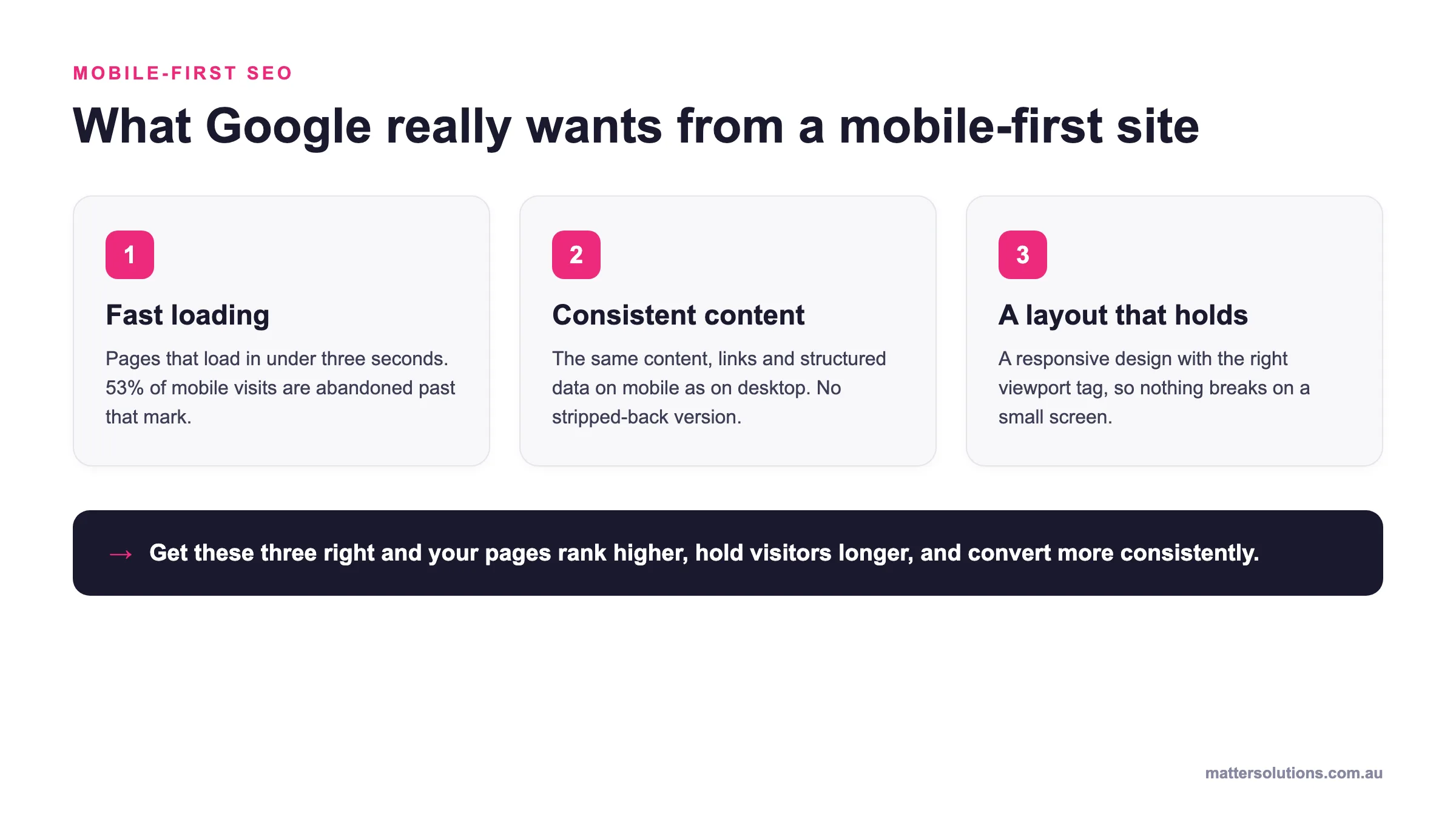
Mobile-first indexing means Google uses your mobile site as the primary version for crawling and ranking. The reason Google cares so much about this comes down to pure numbers.
Research from Statista shows mobile devices now account for over 60% of global web traffic, generating more visits than desktop and tablet combined.
As a result, your mobile pages need to carry the same content as your desktop version. If certain text, images, or internal links only appear on desktop, crawlers will not see them. So that content becomes invisible from a ranking perspective (developers commonly build sites for desktop first and adapt them for mobile later, which is where this issue originates).
On top of content parity, mobile users expect fast load times and smooth navigation. Small tap targets, text that requires zooming, and content wider than the screen all create a poor experience that Google picks up on. You can check for these issues inside Search Console under the Experience section, where the platform’s mobile usability report flags them directly.
How Often Should You Review Your Technical SEO Checklist?
Believe it or not, most technical SEO problems do not appear overnight. Instead, they build up gradually after site updates, plugin changes, and new content additions. By the time you notice a rankings drop, the issue has often been sitting there for weeks.
For most businesses, a full technical SEO audit every six months is a reasonable baseline. That said, high-traffic sites or those publishing content frequently benefit from quarterly reviews. The rule of thumb is simple: the more your site changes, the more often something breaks.
After any migration, redesign, or CMS update, run an immediate audit regardless of your regular schedule. These are the moments where crawl errors, broken internal links, and misconfigured robots.txt files appear most often.
Having worked directly with Australian businesses on their technical SEO, we have seen SEO performance decline sharply after a site rebuild simply because no post-launch audit took place. But you can easily avoid that by making it a non-negotiable step in your launch process.
Pro Tip: Keep an eye on GSC in between full audits. It flags new crawl errors, coverage gaps, and indexing issues as they appear, so you can address problems before they affect your search rankings.
Running a Complete Site Audit Step by Step
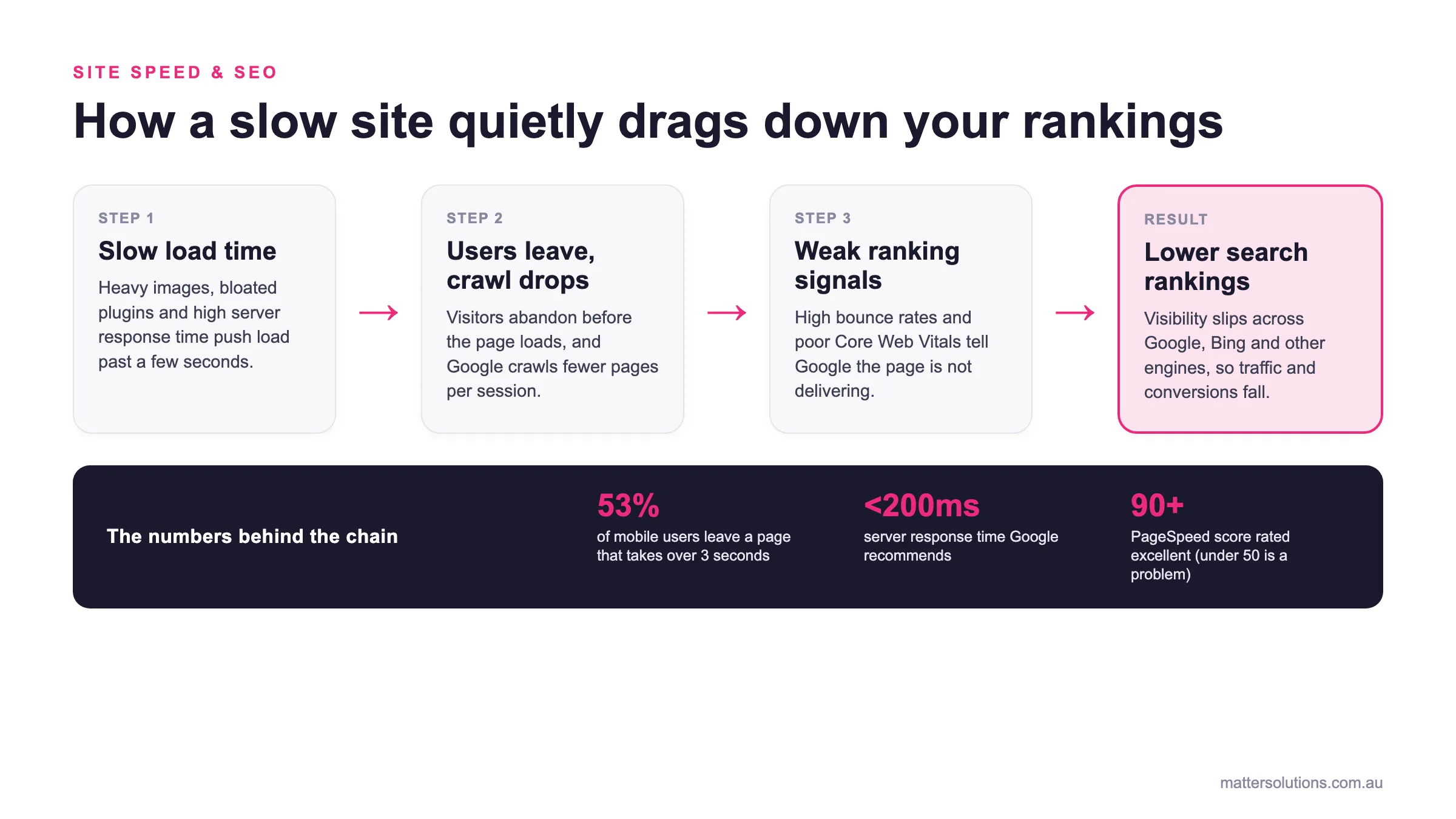
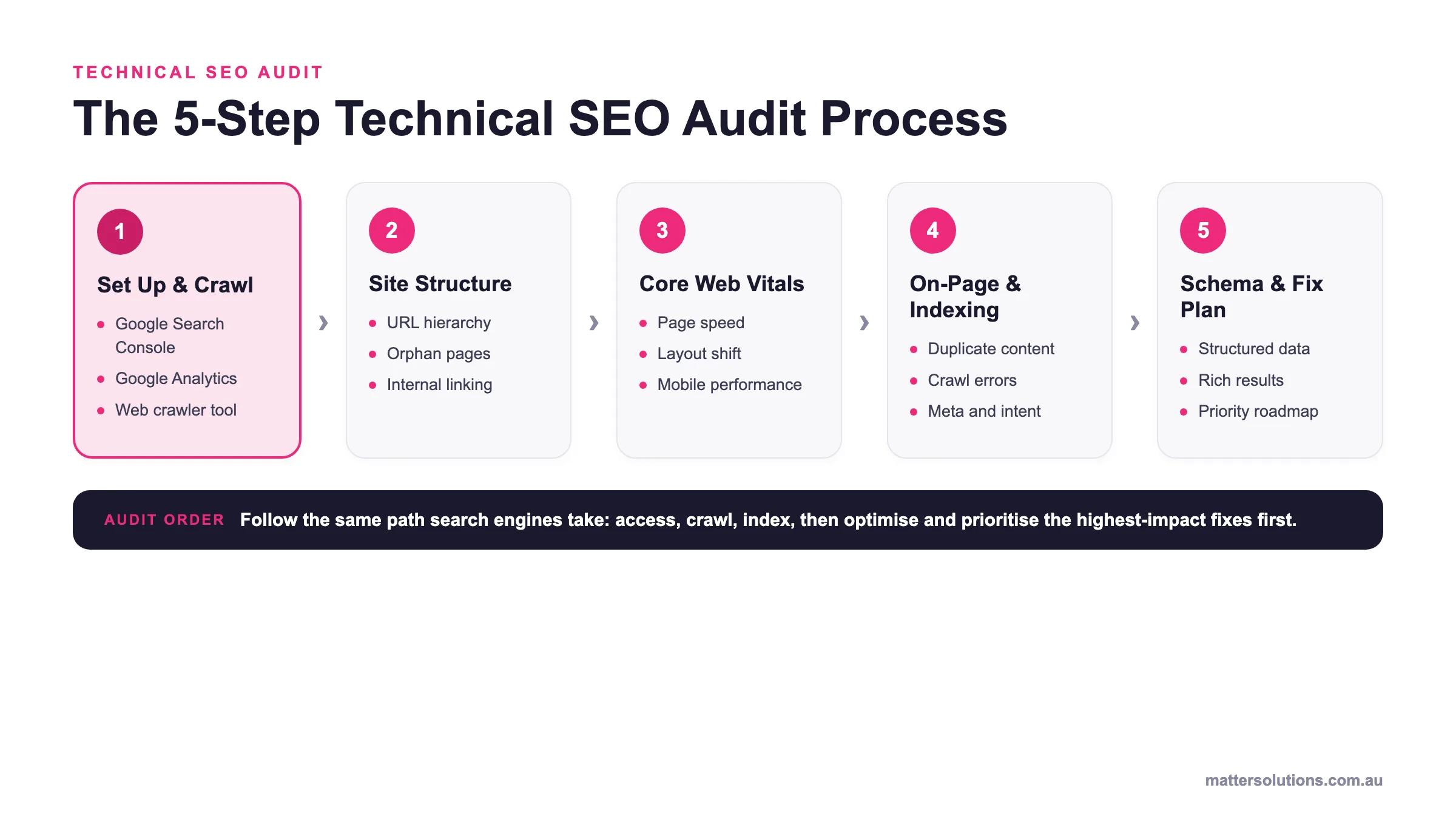
A structured site audit gives you a clear picture of every technical issue across your site, so you can fix problems in order of impact rather than guessing where to start. And that order starts with having the right tools in place.
Tools Worth Using
Screaming Frog is a solid starting point. It crawls the entire site and surfaces redirect issues, broken links, missing metadata, and duplicate content in a single scan. For smaller sites, the free version covers up to 500 URLs, which is enough to identify the most pressing issues across your site.
For a broader view, Semrush and Ahrefs each offer a dedicated site audit tool that flags crawl errors, indexing gaps, and page-level performance issues across your whole domain. Both platforms present findings in a prioritised format, so you are not left sorting through hundreds of raw data points on your own.
Other than crawl-based tools, PageSpeed Insights and the Chrome User Experience Report fill a gap that platforms like Screaming Frog cannot. They provide real-user field data on load times, INP, and visual stability, giving you actual visitor experience metrics rather than simulated results.
What to Check First
Prioritise crawlability above everything else. If search engine bots cannot access and index your pages, no other fix on this list will have any effect. Begin with these three checks:
- Review your robots.txt configuration for any unintended blocks
- Check for noindex tags on pages that should be indexed
- Identify any crawl errors flagged in GSC
If those are clear, then move to website speed and Core Web Vitals. Slow pages frustrate visitors and signal a poor experience to Google, so these fixes tend to have the most noticeable impact on both traffic and engagement once resolved.
From there, work through redirect chains, schema errors, meta descriptions, meta tags, and mobile usability. Addressing these on a site that Google cannot properly access is like painting over a cracked wall; the surface looks better, but the underlying problem remains.
Your Complete Technical SEO Checklist at a Glance
At the end of the day, a checklist is only useful if you can actually work through it without losing your place. So here’s every item from this full checklist organised by category and priority level, which gives you a clear way to triage fixes and track progress as you go.
| Category | Checklist Items | Priority |
| Robots.txt | a. Block admin, staging, and login directories
b. Reference the XML sitemap inside the robots.txt file |
High |
| XML Sitemap | a. Submit sitemap to Google Search Console
b. Remove redirects and noindex URLs from sitemap |
High |
| HTTPS | a. Install SSL certificate and set up HTTP to HTTPS redirects
b. Fix mixed content errors on all pages |
a. High
b. Medium |
| Status Codes | a. Resolve all 404 errors with 301 redirects
b. Collapse redirect chains to single hops |
High |
| Site Architecture | a. Clean up URL structure across all sections
b. Ensure important pages sit within three clicks of homepage c. Fix broken internal links and orphan pages |
a. High
b. High c. Medium |
| Canonical Tags | Add canonical tags to duplicate or near-duplicate pages | High |
| Schema Markup | a. Add LocalBusiness, FAQPage, or relevant schema to key pages
b. Validate structured data via Google’s Rich Results Test |
Medium |
| Core Web Vitals | a. Improve INP to under 200ms
b. Bring LCP down to 2.5 seconds or under c. Reduce CLS score to below 0.1 |
High |
| Mobile | a. Confirm content parity between mobile and desktop versions
b. Fix mobile usability issues flagged in Search Console |
a. High
b. Medium |
| Audit Frequency | Schedule a full technical SEO audit every six months | Ongoing |
Each item is assigned a priority level so you can triage and address the highest-impact fixes first. High-priority items affect crawlability and indexation directly. Medium-priority items build on that foundation and improve overall search visibility once the high-priority issues are resolved.
You might want to save or print this section as a standalone reference for your next audit or site review. Even better, share it with your developer so everyone is working from the same checklist and nothing falls through the cracks.
Ready to Fix Your Technical SEO for Good?
A technically sound site is the foundation on which everything else relies. Without it, even the strongest content and the most carefully built backlink profile will only take you so far.
Fortunately, your technical SEO strategy does not have to be complicated. Start with the high-impact fixes, schedule regular audits to keep things from slipping, and treat your strategy as an ongoing process rather than a one-time job. Sites running on WordPress and custom builds alike follow the same fundamentals.
Our team at Matter Solutions has been helping Australian businesses get this right since 2000. If you want an expert to run a comprehensive technical SEO checklist across your own site, we are ready to help.
Book a free strategy call with Matter Solutions today and let us take a proper look under the hood.
FAQs:
These are the most common questions Australian business owners ask us about technical SEO.
How Does Site Structure Help Search Engines Crawl a Website?
A logical site structure allows search engine crawlers to reach all the important pages far more predictably. When your hierarchy is clear, crawlers move through every section efficiently without hitting dead ends. Poor structure, on the other hand, means some pages may never get discovered or indexed at all.
Can Google Analytics Help You Identify Crawl Errors?
Google Analytics alone will not identify crawl errors directly, but it signals where problems exist. A site that relies heavily on organic traffic will show sudden session drops when crawl issues block main pages. Pair it with Search Console for a more complete picture of what is happening.
Does User-Generated Content Affect Technical SEO on a WordPress Website?
User-generated content on a WordPress website can create duplicate pages or search intent mismatches. These issues discourage search engines from indexing key sections of your site. They can also affect how the mobile version renders for site visitors when comments or reviews cause unexpected layout shifts.
Need help with your digital marketing?
Book a free strategy call and let's discuss your goals.
Book a Strategy Call