Welcome to our guide on how to perform a technical SEO audit for your site.
Here at Matter Solutions, we’ve been running these audits for Australian businesses for decades now. So, we know where the problems hide and how to fix them quickly.
In this guide, we’ll cover the tools you’ll need and how to audit each part of your site. We’ll also look at the most common technical SEO issues and explain how often you should run an audit.
Ready? Let’s get into it.
What Is a Technical SEO Audit?
A technical SEO audit analyses your website’s backend for issues that block search engines from crawling, indexing, and ranking your pages properly. It’s the foundation of any SEO strategy, and without it, even great content can go completely unnoticed.
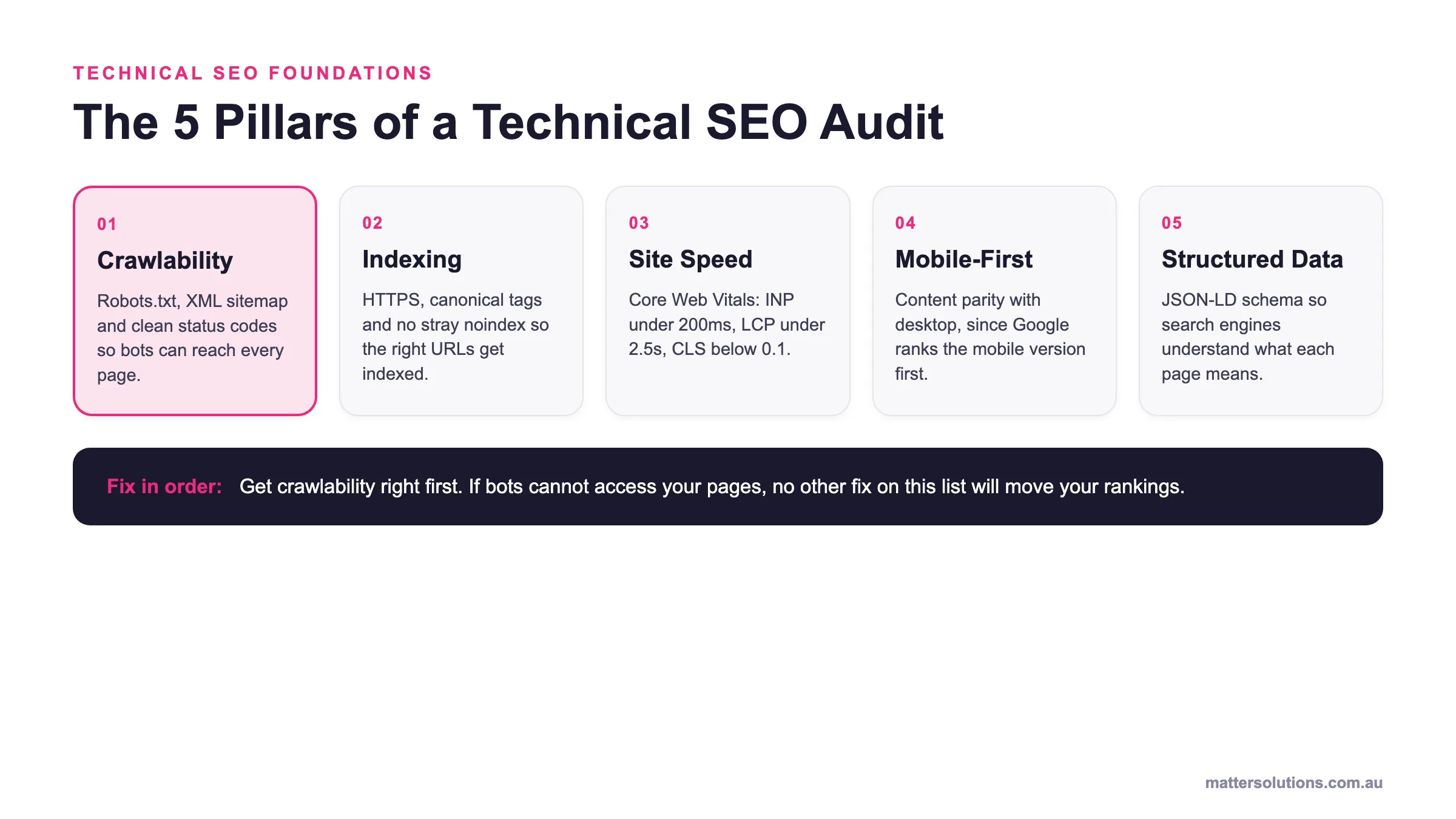
This audit typically covers the areas below:
- Website Crawlability: Search engine crawlers need clear access to all the pages on your site. If something’s blocking that path, like a misconfigured robots.txt file, those pages won’t appear in search results at all. It’s one of the first things we check in every audit.
- Indexing Accuracy: Google doesn’t index all the pages it crawls. Duplicate content, noindex tags, and thin pages can all prevent proper indexing. Google Search Console can help you identify these gaps quickly.
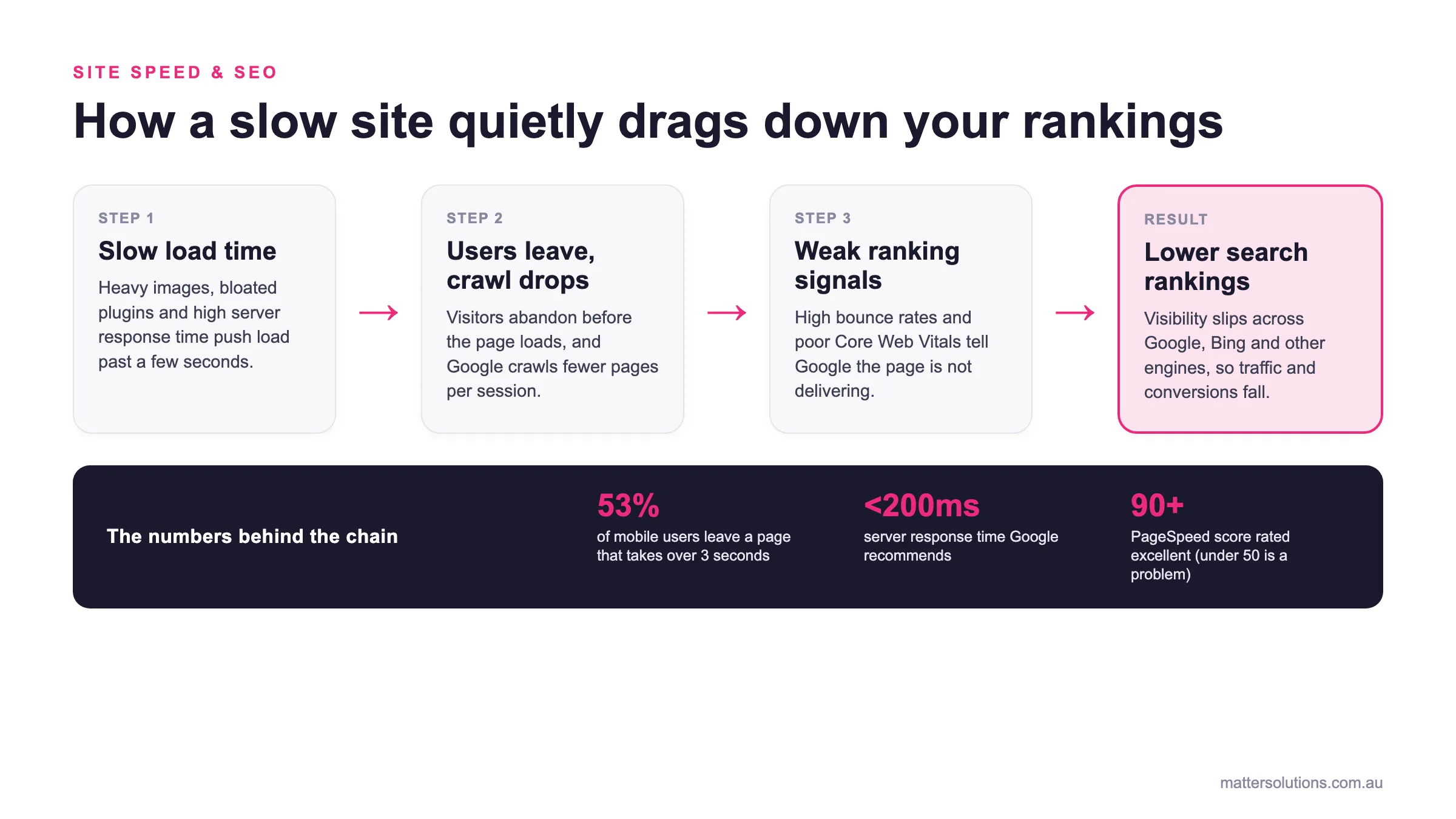
- Page Speed: Slow-loading pages frustrate visitors and can hurt your search performance. Core Web Vitals measure the real-world experience users have on your site, and Google considers these metrics when evaluating page experience.
- Mobile Responsiveness: Your site’s mobile version is the primary version Google uses to evaluate and rank your pages. Poor mobile usability can frustrate visitors, reduce conversions, and limit your organic visibility.
- Site Security: HTTPS protects your visitors’ data and signals trust to both users and search engines. Since Google uses it as a ranking signal, sites without this protocol may be less competitive in search results. A missing SSL certificate can also trigger browser warnings that discourage visitors from continuing.
Problems in any of these areas can affect your site’s performance in search, which is why regular technical SEO audits are so important. They help you identify issues early and keep your website running smoothly.
What Tools Do You Need for a Technical SEO Audit?
You need Google Search Console, Google Analytics, and a crawling tool like Screaming Frog to run a thorough technical site audit. Most of these tools are free, and they cover the majority of what you’ll check during the audit process.
While paid tools like Ahrefs or Semrush add extra depth, you don’t strictly need them for your audit.
The table here includes a breakdown of the most common tools and what each one handles best:
| Tool | What It Does | Best For |
| Google Search Console | Monitors indexing, crawl errors, and search performance | Indexing and crawl checks |
| Google Analytics | Tracks traffic, bounce rates, and user behaviour | Performance monitoring |
| Screaming Frog | Crawls your entire site for technical issues | Broken links, redirects, and meta tags |
| Google PageSpeed Insights | Tests page speed and core web vitals | Site speed fixes |
| Ahrefs / Semrush Site Audit | Runs full technical site audits with scoring | Overall technical health |
We’ve worked with businesses that ran their first audit using nothing but Google Search Console and Screaming Frog’s free version. They found over 200 broken links, a handful of orphaned pages, and duplicate title tags across their entire site.
That said, the tool itself doesn’t produce results. You have to know what to look for in the data.
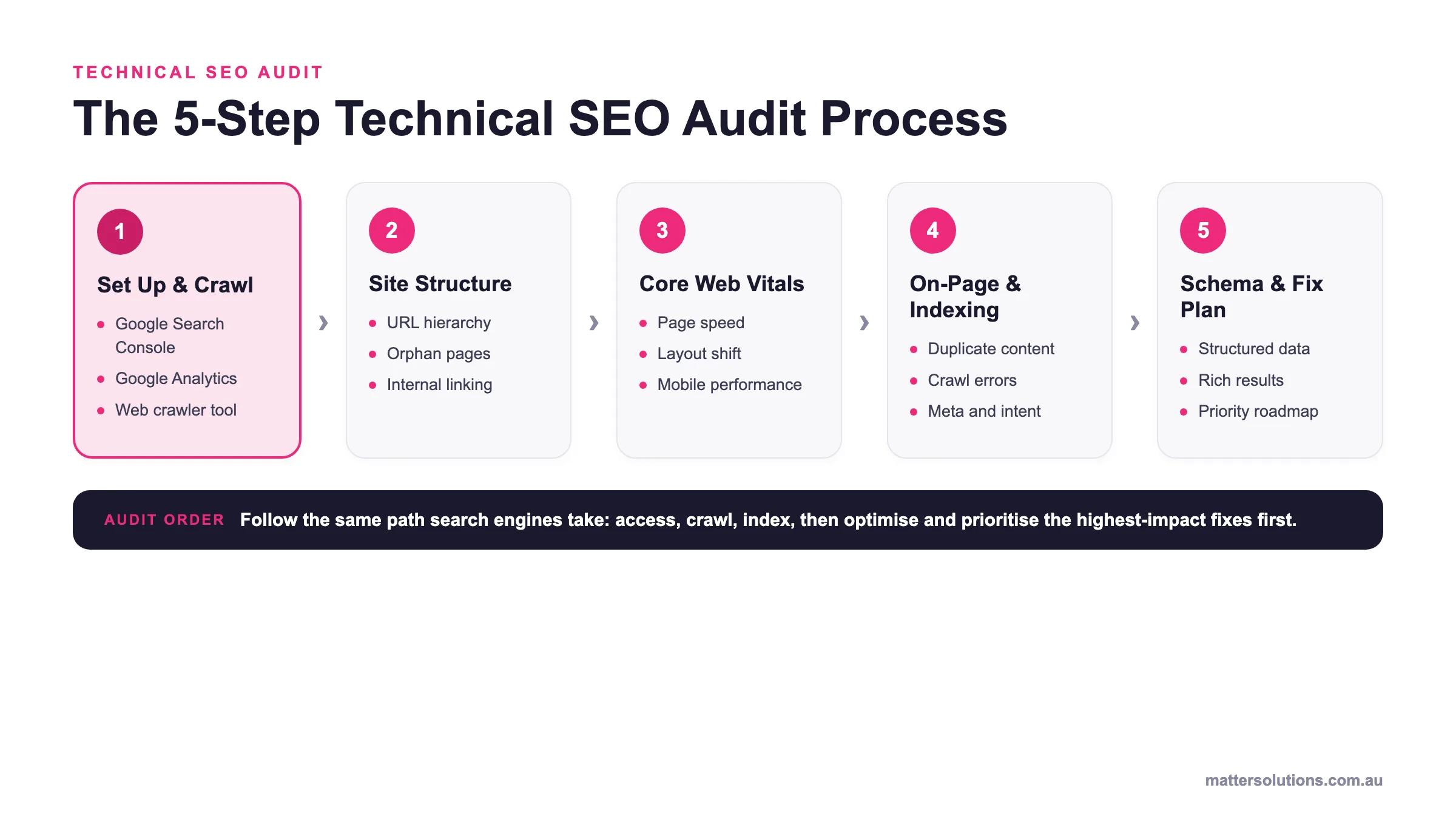
The sections ahead walk you through each part of the audit step by step, so you’ll understand exactly where to focus.
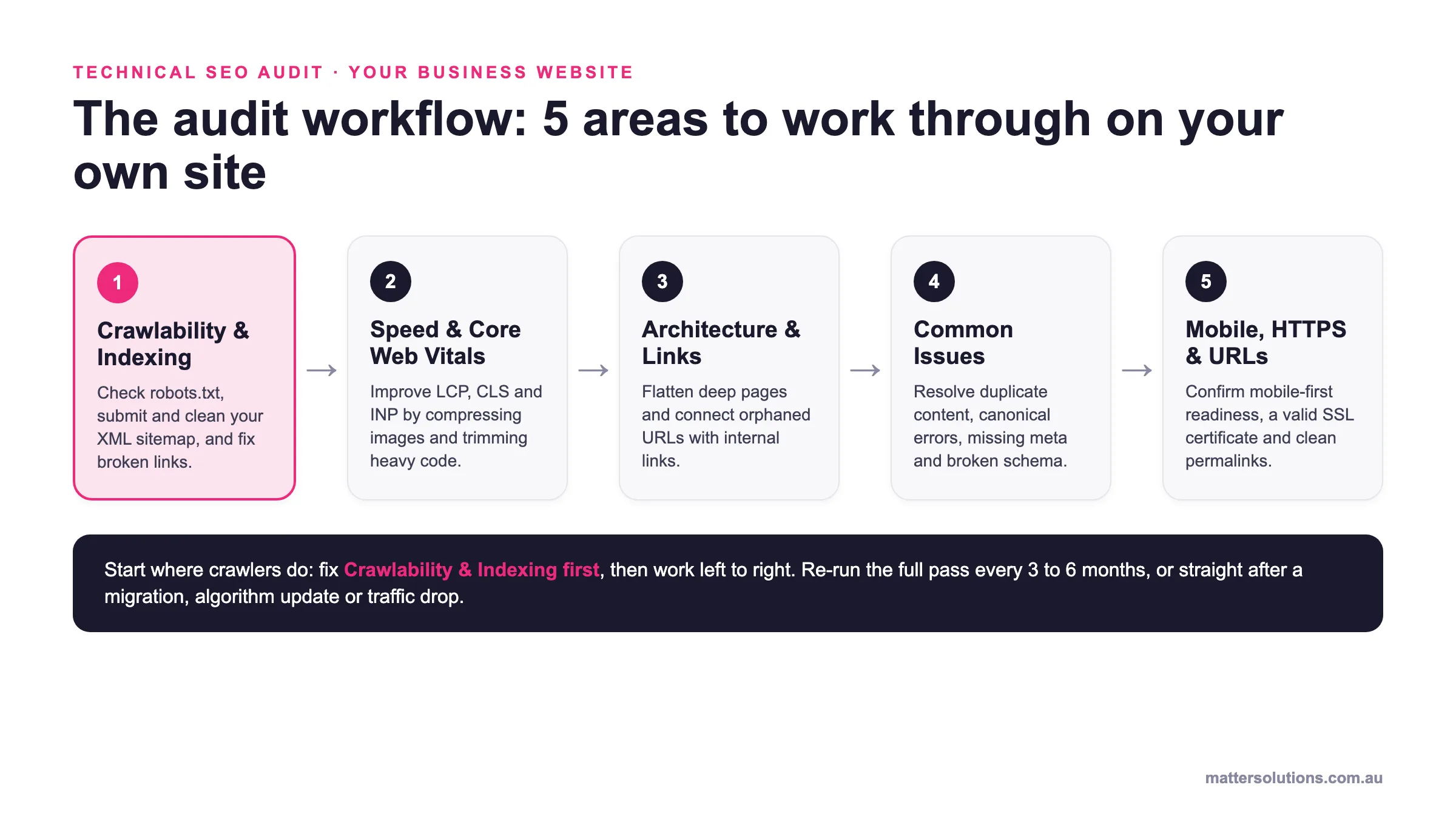
Technical SEO audit · your business website
The audit workflow: 5 areas to work through on your own site
Crawlability & Indexing
Check robots.txt, submit and clean your XML sitemap, and fix broken links.
Speed & Core Web Vitals
Improve LCP, CLS and INP by compressing images and trimming heavy code.
Architecture & Links
Flatten deep pages and connect orphaned URLs with internal links.
Common Issues
Resolve duplicate content, canonical errors, missing meta and broken schema.
Mobile, HTTPS & URLs
Confirm mobile-first readiness, a valid SSL certificate and clean permalinks.
Start where crawlers do: fix Crawlability & Indexing first, then work left to right. Re-run the full pass every 3 to 6 months, or straight after a migration, algorithm update or traffic drop.
The five audit areas to work through when checking your own business website, in the order search engines encounter them.
How Do You Check Crawlability and Indexing?
You check crawlability and indexing by reviewing your robots.txt file, auditing your XML sitemap, and finding broken links across your entire site. If search engine crawlers can’t reach your main pages, they simply won’t appear in search results.
Let’s get into more detail about the areas you should check during this part of the audit.
Review Your Robots.txt File
Your robots.txt file tells search engines which pages they’re allowed to crawl. It sits in your site’s root directory, and a single wrong line in that file can block your most important pages from ever being indexed.
Even a small error in your robots.txt file can create problems for search visibility. Pages may stop appearing in search results, and traffic can decline before you realise anything is wrong (particularly on large websites with thousands of pages).
Google Search Console‘s robots.txt tester allows you to test specific URLs against your current directives.
Submit and Audit Your XML Sitemap
A clean, updated XML sitemap is that it gives search engine crawlers a direct map to every page you want indexed. You need to submit it through Google Search Console so Google can process it faster and flag any errors it finds.
In particular, old redirects, error pages, and URLs with noindex tags shouldn’t be sitting in your sitemap. They waste your crawl budget and send mixed signals about which pages you actually want ranked.
We strongly suggest reviewing your sitemap at least once a quarter to keep it accurate.
Find Broken Links and Redirect Chains
Just like error pages and old redirects, broken links and long redirect chains waste your crawl budget and slow down how search engines index your site. Every broken internal link is a dead end for both crawlers and visitors. That’s lost authority and a poor user experience in one hit.
Redirect chains are just as problematic. When one redirect points to another, and then another, page speed drops and search engines can lose track of the final destination.
Screaming Frog flags broken internal and external links across your entire site in minutes, so it’s worth running a full crawl regularly.
Technical Note: Search engines follow redirects, but every additional hop increases the risk of crawling delays and processing inefficiencies.
How Do You Fix Site Speed and Core Web Vitals?
The best way to fix site speed and Core Web Vitals is to identify and remove the technical issues that slow your pages down. Common solutions include image optimisation, code reduction, and improvements to Core Web Vitals metrics.
Here are the four core web vitals and speed factors to focus on:
- Largest Contentful Paint: Your main page content should become visible to users within 2.5 seconds or less. Oversized images and slow CSS files are almost always the biggest reasons behind a failing LCP score.
- Cumulative Layout Shift: Buttons, text, and images that jump around while a page loads frustrate visitors and hurt rankings. You can stop it from happening by using fixed dimensions on all images and ad slots.
- Interaction to Next Paint: Google replaced First Input Delay with INP as its responsiveness metric in March 2024. Heavy JavaScript on the main thread is the most common reason sites fail here.
- Image and Script Optimisation: You should compress your images, convert them to WebP, and defer non-critical JavaScript so it doesn’t block rendering. Minifying CSS files and removing unused code can reduce load time further.
Once your core web vitals pass Google’s thresholds, your pages will load faster, rank better, and keep visitors on your site longer.
How Do You Audit Site Architecture and Internal Linking?
You audit site architecture by checking how deep your main pages are and whether internal linking connects them in a logical structure.
A messy site structure makes it harder for search engines to understand your content hierarchy. It also spreads your link authority thin across pages that don’t need it.
We’ll now go through these steps.
Flatten Your Site Structure
Could your site structure be holding back your SEO performance? When important pages sit too deep within your website, users and search engines may have a harder time finding them. Large category structures and filter URLs often contribute to this problem.
Think of your site like a filing cabinet. If someone has to open five drawers to find one document, they’ll give up. Search engines work the same way.
In short, a logical hierarchy with clear parent and child relationships helps both users and crawlers reach your key pages faster.
Pro Tip: If a page requires more than four clicks to reach, consider whether it belongs in your primary site structure at all.
Find and Fix Orphaned Pages
Orphaned pages have no internal links pointing to them. That means search engine crawlers can’t discover them. The only way Google finds these pages is through your XML sitemap (and even then, they’ll receive almost zero authority).
The fix involves running a full crawl of your site and comparing the results against your sitemap URLs. Any page that appears in the sitemap but not in the crawl is likely orphaned. So you need to link it to a relevant parent page or related content to earning authority again.
Orphaned content is just one of many technical factors that can influence how well a website performs in search results. The following issues are among the most common technical SEO challenges.
What Are the Most Common Technical SEO Issues?
The most common technical SEO issues include duplicate content, canonical tag errors, and missing meta tags. In addition, broken schema markup can make it harder for search engines to understand and discover your content.
To understand the risks involved, it’s worth examining each of these technical SEO issues in more detail:
- Duplicate Content: Google can’t decide which version to rank when the same content appears across multiple pages. Canonical tags fix this problem by telling search engines to index only one version.
- Canonical Tag Errors: A bulk CMS update can point hundreds of product pages on a single site to one URL. Those pages can vanish from search results overnight. That’s why every indexable page should have a self-referencing canonical.
- Missing Meta Tags: When a page lacks a unique title tag or meta description, Google may generate its own snippet from the page content. To maintain control over how your pages appear in search results, keep title tags under 60 characters and meta descriptions under 155 characters.
- Broken Schema Markup: Rich results like star ratings, FAQs, and pricing won’t appear in Google if your structured data contains errors. We recommend running your URLs through Google’s Rich Results Test regularly and fixing those issues.
Since websites change constantly, you’ll need to review technical SEO regularly rather than treat it as a one-off task.
What Other Technical Checks Should You Run?
You should also check mobile friendliness, HTTPS security, and URL structure. These factors affect how search engines rank your site.
Let’s take a closer look at these elements.
Mobile Friendliness and Responsive Design
Google completed its transition to mobile-first indexing in July 2024. That means Google primarily uses your site’s mobile version for crawling, indexing, and ranking. So if important content or functionality isn’t available on mobile devices, your search visibility can suffer across all devices.
Google Search Console has a dedicated mobile usability report that flags specific issues like small tap targets, text that’s too tiny to read, and content wider than the screen. Run it during every audit cycle and fix whatever it flags.
HTTPS and Site Security
A secure HTTPS connection protects your visitors’ data and gives your site a confirmed ranking signal in Google. Sites still running on HTTP trigger “Not Secure” warnings in most browsers, and that alone is enough to drive visitors away before they even read your content.
Mixed content warnings are another common issue. They appear when your page loads over HTTPS but pulls in images, scripts, or stylesheets over HTTP (browsers often block some of these requests automatically).
You need to check your SSL certificate expiry date during every audit, too, because a lapsed certificate can take your entire site offline.
URL Structure and Clean Permalinks
Your URLs provide valuable context about the content on each page. When URLs are short and descriptive, they’re easier for users to read and search engines to interpret.
In contrast, long parameter strings, random ID numbers, and special characters make URLs harder to crawl and nearly impossible to remember.
The best practice here is to keep your permalinks consistent across your entire site and match them to the page’s topic. A clean URL structure also makes your internal and external links simpler to manage over time.
SEO Insight: A stable URL often performs better over time because it accumulates links, engagement signals, and historical trust.
How Often Should You Run a Technical SEO Audit?
You should run a technical SEO audit every three to six months to keep your website in good shape. However, certain events may require an immediate audit, including site migrations, algorithm updates, and sudden traffic drops.
There’s actually no universal schedule that works for every website. Rather, you should determine your site’s audit frequency based on how often your site changes and how competitive your industry is.
Full technical audits typically start with one of the following triggers:
- After a Site Migration: Migrations tend to break links, lose redirects, and create new error pages across your entire site. That’s why it’s important to run a full audit right after any domain or platform move, and check Google Search Console for indexing drops within the first week.
- Every Three to Six Months: Most business websites should conduct a technical SEO audit at least twice a year. It’ll help you catch broken links, new crawl errors, and outdated sitemaps before they start to affect your rankings.
- After an Algorithm Update: Google’s algorithm changes can change how technical aspects influence your search performance. A quick audit after any major update reveals whether your site took a hit, especially around core web vitals and mobile friendliness.
- When Traffic Drops Suddenly: An unexpected dip in organic traffic often points to a hidden technical problem. Google Analytics and Search Console can help you identify crawl issues, indexing errors, and other problems that may be affecting visibility.
- Before a Major Redesign: Run an audit before any redesign so you have a clear benchmark of your current search performance. You’lll give your web developers a list of specific URLs, redirects, and internal links to preserve during the build.
- After Adding New Content: Large batches of new pages can accidentally create duplicate content or orphaned URLs. Verify that every new page appears in your XML sitemap and has at least one internal link pointed at it.
Ultimately, the goal is to identify potential issues before they have a measurable impact on performance.
| Audit Area | What to Check on Your Site | Tool |
|---|---|---|
| Crawlability & Indexing | Robots.txt is not blocking key pages, the XML sitemap is submitted and free of noindex or redirect URLs, and no broken links or redirect chains remain. | Google Search Console, Screaming Frog |
| Speed & Core Web Vitals | LCP under 2.5 seconds, stable layout (CLS), responsive interactions (INP), with images compressed to WebP and non-critical scripts deferred. | Google PageSpeed Insights |
| Architecture & Internal Linking | Important pages sit within four clicks of the home page, the hierarchy has clear parent and child pages, and orphaned URLs are linked back in. | Screaming Frog, Google Search Console |
| Common Technical Issues | No duplicate content, self-referencing canonical tags in place, unique title tags and meta descriptions, and valid schema markup. | Google Rich Results Test, Ahrefs or Semrush Site Audit |
| Mobile, HTTPS & URLs | Mobile version carries all key content, HTTPS is active with a valid SSL certificate and no mixed content, and permalinks are short and descriptive. | Google Search Console, browser security check |
Don’t Let Technical Issues Hold Your Site Back
A full technical SEO audit doesn’t have to feel overwhelming when you break it into manageable tasks. Each review helps you identify problems early and confirm that recent changes are working as intended.
You don’t have to do this alone, either. Matter Solutions has been running technical SEO audits for businesses across Australia since 2000.
Get in touch with our team, and we’ll help you find exactly what’s holding your site back.
Frequently Asked Questions (FAQs)
Technical SEO can get complicated once you move beyond the basics. The answers below cover some of the questions website owners often ask about search visibility, website performance, and the technical factors that influence long-term SEO success.
Can Technical SEO Improve Search Engine Rankings Without Publishing New Content?
Yes. Technical improvements can strengthen search engine rankings by helping search engines index and process existing content more efficiently.
How Does a Backlink Checker Support a Technical SEO Audit?
A backlink checker can identify broken backlinks, redirect issues, and outdated URLs linking to your website. Fixing these problems helps preserve authority and supports both technical SEO and broader marketing efforts.
Why Should You Monitor Your Website’s Technical Health?
Your website’s technical health influences how efficiently search engines crawl, render, and evaluate your content. Regular monitoring can uncover issues before they affect visibility, performance, or web traffic.
Do Technical SEO Audits Help Other Search Engines?
Yes. Although most website owners focus on Google, other search engines rely on similar crawling and indexing processes. A technically sound website improves accessibility across multiple search platforms.
Can Canonical Tag Issues Affect Category Pages?
Absolutely. Canonical tag issues can prevent category pages from appearing correctly in search results when search engines receive conflicting instructions about which URL version should be indexed.
What’s the Difference Between Technical SEO and On-Page SEO?
On-page SEO focuses on content, headings, and keyword optimisation, while technical SEO addresses the infrastructure that helps search engines crawl, render, and rank your website effectively.
Why Is a Secure Server Important for SEO?
A secure server helps protect user data, reduce security risks, and maintain trust. Search engines also prefer secure websites because they provide a safer browsing experience for visitors.
Can Technical SEO Lead to More Organic Traffic?
Yes. Technical improvements often create opportunities for more organic traffic by removing obstacles that limit crawling, indexing, and visibility. Better accessibility can also help search engines understand your content more accurately and reduce signals that might confuse search engines.
Need help with your digital marketing?
Book a free strategy call and let's discuss your goals.
Book a Strategy Call