You've probably opened your inbox this morning and found it flooded with rubbish from your contact forms. Fake enquiries, dodgy links, and messages that make zero sense. It's frustrating, wastes your time, and buries the real customer questions you need to see.
Form spam is one of those problems that sneaks up on Australian businesses. One day, you're getting a few genuine enquiries; the next, you're drowning in 50 spam submissions every week.
And if you don't stop contact form spam now, it'll eventually cost you leads, damage your email reputation, and waste hours of staff time weekly.
But you know what? You don't need to be a tech expert to resolve this issue. Three simple rules can protect your contact forms and get your inbox back under control.
Form spam is unwanted information submitted through website forms by bots or humans for malicious purposes.
How does form spam happen? Well, spammers target your online forms to advertise products, spread malware, boost their SEO rankings, or send abusive messages. Unfortunately, any form on your site can attract spam, including contact forms, comment sections, registration pages, and payment forms.
The two most common types of form spam are:
1. Automated Bot Spam
The fastest way spammers attack is through automated bots that fill forms without human involvement.
Bots crawl websites looking for forms and automatically fill them with pre-programmed content. These automated programs can submit hundreds of forms per hour, which churn through your contact forms faster than you can delete them.
Remember: Bot spam typically contains repetitive patterns, gibberish text, or suspicious links to external sites.
2. Manual Spam Submissions
Surprisingly, some companies hire real people to manually submit spam through website forms. This type of spam is more difficult to detect because manual spammers behave like legitimate users. They carefully fill out forms, use realistic language, and avoid obvious red flags.
These spam form submissions often appear genuine at first glance, but typically include:
Irrelevant sales pitches
Promotional messages
Backlinks (intended to boost search engine rankings)
While they may look harmless, manual spam wastes time, clutters databases, and exposes your site to security and SEO risks.
What Does Form Spam Cost Brisbane Businesses?
Form spam costs Brisbane businesses significant time and money through wasted staff hours and damaged email reputation. But let's be real here, most business owners think spam is only there to annoy you and fill up your inboxes.
But when you receive spam through your contact forms week after week, you end up losing money on wasted staff time, missing real customer enquiries, and risking your entire email system getting blacklisted.
Here's where it hits your bottom line:
The Time Drain Reality
Sorting through 50 spam submissions/week equals 2-3 hours of wasted staff time. At Brisbane's average business hourly rate, that's $200-300 lost every single week, which becomes thousands of dollars wasted over the year.
Also, most legitimate enquiries get delayed responses because staff are buried in spam filtering tasks. Your customers are waiting while your team sifts through unwanted messages and forms data that serves no purpose.
Email Deliverability Damage
When spam floods your forms, email providers may flag all your website emails as spam. Why? Because they see multiple suspicious messages coming from your domain and assume your entire site is compromised. This means genuine customer enquiries never reach your inbox.
Based on our experience, repairing a damaged sender reputation takes months through technical email authentication fixes. You'll also face security risks, financial harm, and potential phishing attempts hidden in those spam emails.
Never Mark Contact Form Emails as Spam (Important)
This is one of the most common and most damaging mistakes we see.
Contact form notifications are typically sent from your own domain (for example, [email protected]). When you mark those emails as spam, email providers record a negative signal against your domain, not the sender of the spam.
If this happens repeatedly:
Contact form enquiries may stop arriving
Automated emails (quotes, bookings, password resets) can disappear
Your emails may land in spam for customers as well
However, simply “unmarking” emails later does not immediately fix the issue.
Even large platforms such as Airbnb have publicly discussed deliverability issues caused by sender reputation signals. For smaller Australian business domains, recovery is often slower and far more disruptive.
Remember: Spam should be filtered at the form level when being sent from your website, never in your inbox.
Now that you understand the real costs, let's examine the tools that can protect your forms.
What's the Best WordPress Form Plugin for Spam Protection?
Gravity Formsand WPForms are the two most reliable WordPress plugins for blocking form spam.
While most free options give you basic honeypot protection, they lack the advanced spam filters and form validation needed to stop form spam properly. Premium plugins like Gravity Forms and WPForms integrate multiple spam prevention layers, including Google reCAPTCHA, Akismetfiltering, and custom captcha systems.
They also support payment forms, conditional logic, and all the features you need to build professional contact forms that actually work.
See how these two plugins handle spam protection:
1. Gravity Forms Built-In Protection
What if your form plugin could block spam automatically without installing extra security tools? Yes, that's possible with Gravity Forms.
As we already mentioned, Gravity Forms includes honeypot fields, reCAPTCHA integration, and Akismet filtering out of the box. The plugin lets you add Cloudflare Turnstile and custom validation rules for extra protection, which give you proper form validation without needing five different add-ons.
This level of protection is the reason why we at Matter Solutions use Gravity Forms across client sites. It balances form spam prevention with usability. So real site visitors don't get annoyed, and spam bots can't submit forms.
2. WPForms Modern Anti-Spam
WPForms provides invisible anti-spam tokens that block bots without requiring user interaction. The plugin includes built-in spam detection algorithms that run behind the scenes, so your contact form submissions will also stay clean.
This WordPress plugin also integrates with Akismet and multiple CAPTCHA systems for layered spam defence. It's easier to set up than Gravity Forms, but it gives you slightly fewer anti-spam features overall.
After you've chosen the right plugin, it's time to add reCAPTCHA protection.
Rule #1 - Use Google reCAPTCHA v3
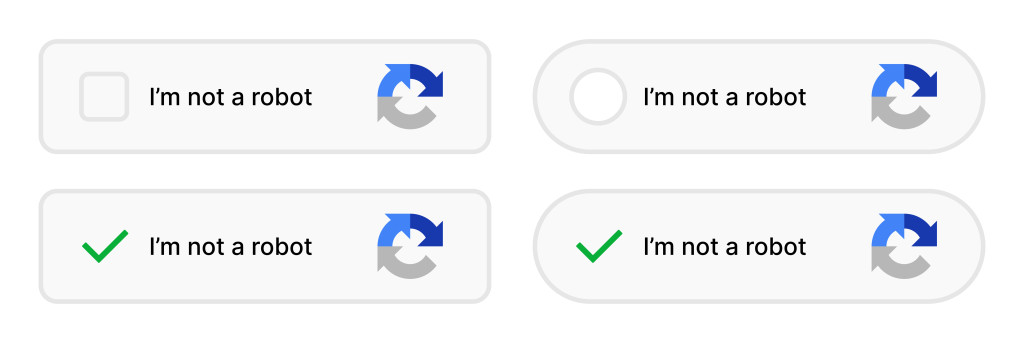
Google reCAPTCHA v3 runs invisibly in the background and never interrupts users with verification challenges like image selection or checkbox clicking.
Here's the thing. Older versions made people click checkboxes or select traffic lights in images, which frustrated human users and killed form conversions. But Version 3 ditched all that nonsense.
The system analyses mouse movements, typing patterns, and browsing behaviour to identify bots automatically. It watches how site visitors interact with your web forms and assigns each submission a risk score from0.0 to 1.0. The higher the score, the more likely it's a human.
So real humans get high scores and breeze through, while automated bots get flagged and blocked before they waste your time. Plus, the invisible reCAPTCHA approach means your contact forms look clean and professional (no ugly CAPTCHA boxes or annoying site visitors with puzzles they can't solve).
It also stops spam form entries from reaching your database in the first place. That means cleaner data, faster form processing, and no more sorting through rubbish submissions every morning.
The spam detection happens before the form even processes, which saves your server resources and keeps everything running smoothly.
Good to Know: Version 3 is free for up to10,000 assessments monthly and works with all major WordPress plugins. That means you won't pay a cent unless you're running a huge site that gets over ten thousand form submissions per month.
If you're wondering how to set this up, don't worry. We'll walk you through it step by step.
How Do You Set Up reCAPTCHA on WordPress?
Setting up reCAPTCHA takes about 15 minutes and only requires copying two API keys: the site key and secret key.
We understand this might sound technical if you're not a developer. You don't want to break your website or mess up your contact forms while trying to stop spam. However, just follow the steps we've outlined below, and you'll have it sorted without any headaches.
First up, visit the Google reCAPTCHA admin console and register your site domain to receive API keys. You'll need to enter your website URL and select reCAPTCHA v3 from the version options.
In Gravity Forms or WPForms, you'll find the reCAPTCHA settings in your WordPress dashboard under the form editor. Just drop in both keys there and save. Then add the reCAPTCHA field to your contact forms and test submissions to confirm protection works.
From there, drag the invisible reCAPTCHA field into your form builder, publish the changes, and submit a test entry. If you answer correctly (meaning you behave like a human), the form goes through. The code runs automatically in the background without showing anything to site visitors.
Useful Tip: Check your Google reCAPTCHA dashboard after a few days to see how many spam bots you've blocked. The analytics from the Google console show you exactly how much rubbish you're avoiding.
Rule #2 - Enable Akismet Spam Filtering
Akismet checks every submission against a global database of known spam patterns and suspicious behaviour. The service was created by Automattic, the same company behind WordPress itself, so it integrates perfectly with your WordPress plugin setup.
The Akismet plugin works differently from reCAPTCHA. Instead of trying to detect spam bots before they submit, Akismet analyses the actual content of each form submission. It looks at the email address, message text, links, and dozens of other signals to spot spam.
Think of it as having advanced spam filters that learn from millions of websites simultaneously. The service integrates directly with Gravity Forms and WPForms to filter spam submissions. When someone fills out your contact forms, Akismet runs a quick check.
If the submission looks dodgy, it’ll get flagged as spam before hitting your inbox. The spam detection algorithms work across your entire WordPress site, blocking spam comments and fake user registrations at the same time.
Here's how to get started: You'll need an API key from the Akismet website to activate the service. The paid plans start around $10 monthly for commercial websites, which is nothing compared to the time you'll save not sorting through rubbish.
However, Akismet isn't perfect on its own and occasionally misses sneaky spam that slips through. That's why you should pair it with reCAPTCHA for maximum protection. Combining both tools gives you layered anti-spam protection that's tough for spammers to beat.
Rule #3 - Set Up Email Filters and IP Blocking
This is where most people go wrong. They try filtering spam too aggressively and end up accidentally blocking legitimate customers, too.
So instead, start small. Only filter email addresses you've seen spamming your contact forms multiple times and track the patterns for a week or two before creating permanent filters.
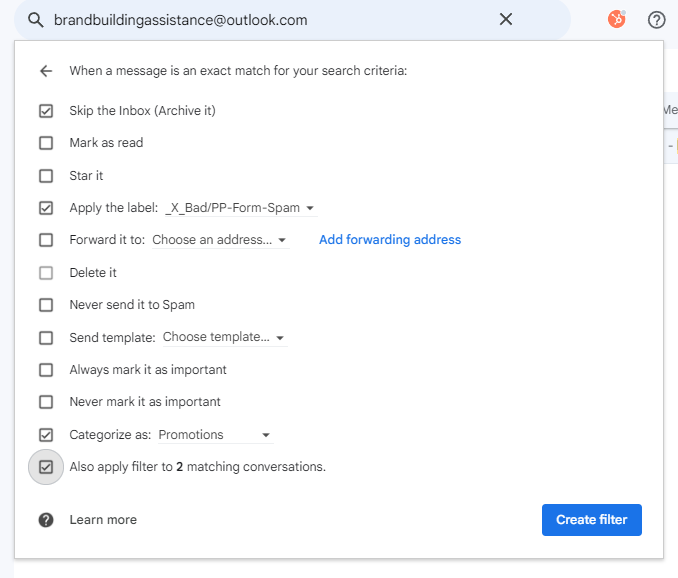
The process is simple in Gmail:
Search for the spam email address
Click the three dots, and select "Filter messages like this."
Tell Gmail to skip the inbox and apply a label like "Form Spam."
Just do that, and voila! Those spam form submissions never bother you again.
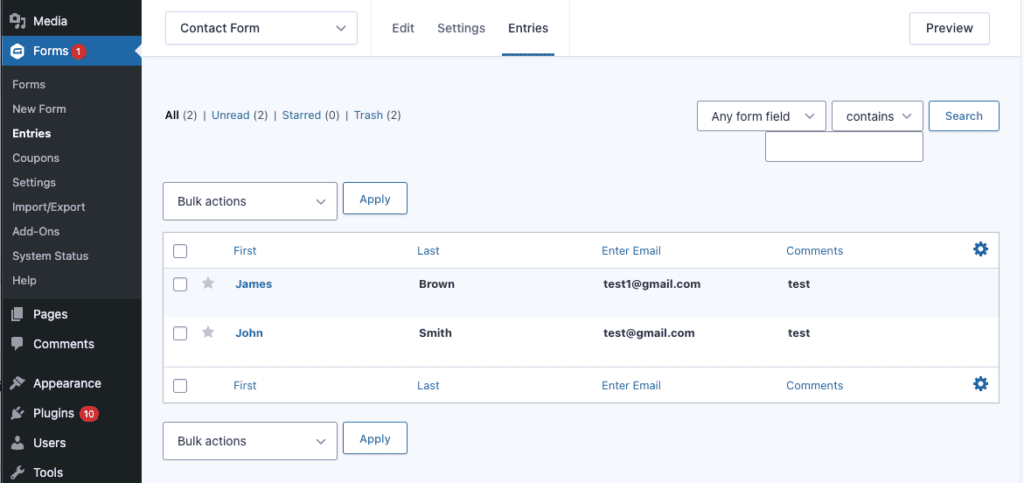
Another layer of protection is IP blocking. Track repeat offender IP addresses in your form logs and add them to your server's deny list (most WordPress plugins show you the IP address of each submission in the form entries section). If you see the same IP hammering your contact forms with spam, block it at the server level.
We recommend combining email filters with IP blocking for layered protection against persistent spammers over time. While email filters catch the obvious repeat offenders by address, IP blocking stops them from even accessing your web forms in the first place.
Together, they block form submissions before they waste your time.
Should You Use Cloudflare Turnstile Instead of reCAPTCHA?
It depends on whether you prioritise Google's proven track record or Cloudflare's privacy-first approach.
Both reCAPTCHA and Cloudflare effectively stop spam bots, but they take different approaches. While Google reCAPTCHA has been the industry standard for years, Turnstile has been gaining traction since 2024 because of its privacy stance and cleaner user experience.
We've already gone through how reCAPTCHA works and why it's effective. So in this section, we're going to break down Turnstile's advantages so that you can decide which one suits your business better.
Privacy Benefits of Turnstile
Turnstile doesn't use cookies or track user behaviour across websites for advertising purposes. The service complies with Australian privacy regulations without needing consent banners, which keeps your contact forms clean and simple.
Users concerned about Google tracking prefer Turnstile because it operates independently from advertising networks.
So if you care about privacy, it keeps your customer data completely private while still blocking spam effectively. It uses a hidden form field approach combined with browser behaviour checks instead of relying on tracking data.
User Experience Improvements with Turnstile
Believe it or not, Turnstile challenges are faster and less intrusive than traditional reCAPTCHA image selection puzzles. The system uses browser behaviour checks and human interaction patterns that complete in under one second. Your website visitors barely notice the verification happening.
Gravity Forms and WPForms both added Turnstile support in 2024, which makes integration easy. What's more, you can swap from Google reCAPTCHA to Cloudflare Turnstile in your WordPress plugin settings with just a few clicks.
The setup process is nearly identical, since they both use custom CAPTCHA fields and API keys just like reCAPTCHA does.
How Often Should You Review Spam Submissions?
You should check your spam folder every week to catch legitimate enquiries flagged by mistake.
Even the best spam protection systems make mistakes occasionally. For example, real customers with unusual messages or suspicious-looking email addresses sometimes trigger false positives.
So, check your form plugin's spam entries every Monday morning as part of routine maintenance (sounds tedious, we know). Most WordPress plugins, like Gravity Forms, store spam submissions separately from real form entries. Scan through them quickly to make sure nothing important slipped through.
We spend 15 minutes weekly reviewing spam to ensure no genuine Brisbane enquiries slip through. That's about 50 hours per year saved by having proper spam protection in place, compared to the hundreds of hours we'd waste without it.
Monthly, update your email filters and IP block lists to remove outdated entries. Some spammers change their email addresses or move on to other targets. Clean out old filters so your list stays manageable.
Down the track, audit your entire spam prevention setup every few months to confirm all integrations still work. A quick check ensures your spam problems stay solved long term.
Take Control of Your Form Spam Today
By this point, you know form spam doesn't have to control your inbox or waste your team's time. The three rules we've covered, reCAPTCHA v3, Akismet filtering, and email filters with IP blocking, give you layered spam protection that actually works.
Start with reCAPTCHA v3 today. It takes 15 minutes to set up and immediately blocks most automated bots from hitting your contact forms. Add Akismet next for content-based spam detection, then fine-tune your email filters as patterns emerge.
Need help setting up proper spam protection for your Brisbane business?
Our team at Matter Solutions has been handling form spam for clients since 2008. We'll get your contact forms sorted so you can focus on real customers instead of deleting rubbish all day.
What do you do? Comment below.
Want some help?
If you want some help doing this for your website then speak with a web team member. Use this button to book a call back with a web specialist.
Ben Maden founded Matter Solutions in April 2000 and remains the Lead Web & SEO Consultant today. While Matter Solutions originated in London, UK, the company took on Australian clients when Ben emigrated to Brisbane in November 2006.